
Turning Anonymous Traffic into Structured Data via APIs
Identify anonymous B2B visitors with IP lookup and enrichment APIs, score and segment leads, and sync structured profiles to CRMs while staying privacy-compliant.
11 februari 2026
This means most potential leads vanish before you can engage with them. But APIs can help solve this problem by transforming anonymous web traffic into structured, actionable data. Here's how:
IP Lookup APIs: Match visitor IP addresses with global business databases to identify companies in real time (200ms or less).
Data Enrichment APIs: Add firmographic details like company size, industry, and revenue, plus behavioral insights like pages viewed and session duration.
Lead Scoring: Prioritize high-value prospects based on behavior and fit with your target audience.
CRM Integration: Automatically sync structured lead data with tools like Salesforce and HubSpot for streamlined workflows.
Example: Tools like LeadBoxer identify and qualify visitors, offering 50,000 free credits and pay-as-you-go pricing. Companies can integrate this data into their sales pipelines, increasing conversion rates by focusing on engaged, high-priority leads.
APIs make it possible to track visitor behavior, identify companies, and turn website traffic into real sales opportunities - all while staying compliant with GDPR and CCPA.
How APIs Identify and Qualify Anonymous Visitors
APIs work by capturing technical signals from a visitor and matching their IP address to business databases in real time - often in as little as 200 milliseconds. This process reveals the company behind the traffic. Once identified, the API adds firmographic details like industry classification, employee count, estimated revenue, and location. It also includes a "type" field that identifies whether the IP comes from a business network, an ISP, or another source, making it easier to filter out residential traffic automatically.
However, even top-tier tools can only identify 15%–40% of B2B visitors. To improve coverage, ensure your API supports both IPv4 and IPv6 addresses. Leading databases are updated daily to reflect changes like company relocations, mergers, and the growing trend of remote work.
Now, let’s dive into how IP lookup APIs provide instant company identification.
Using IP Lookup APIs to Identify Companies
IP lookup APIs compare a visitor's IP address with corporate databases to retrieve company details. When a visitor lands on your site, the API captures the IP and cross-references it with global IP registries and business records, instantly identifying the company.
The returned data typically includes essential details like company name, domain, industry, employee range, and estimated annual revenue. These APIs also classify the type of network, flagging whether the visitor is using a corporate network or a consumer ISP. This allows you to focus on business traffic while filtering out irrelevant visits from residential users.
Once the company is identified, data enrichment APIs can take things further by adding valuable behavioral insights to your lead profiles.
Using Data Enrichment APIs to Build Lead Profiles
Data enrichment APIs enhance basic company identification by adding layers of behavioral and contextual data. Using tools like identity graphs and first-party cookies, these APIs consolidate sessions across devices, creating a unified profile for a single company - even if visits originate from multiple locations or devices.
In addition to firmographic details, enrichment APIs track behaviors like pages viewed, time spent on the site, content downloads, and repeat visits. Some tools even leverage machine learning to infer details such as a visitor’s job role or buying stage based on referral sources and browsing activity. Importantly, this is done without collecting personally identifiable information, ensuring compliance with GDPR and CCPA.
With the decline of third-party cookies, APIs are turning to browser fingerprinting and server-side tracking to maintain accurate visitor profiles. These methods analyze browser settings, plugins, and screen resolution to create persistent unique identifiers across sessions. To ensure clean data, it’s essential to exclude internal IPs, partners, and agencies from your analysis.
Converting Traffic into Structured Data with the LeadBoxer API
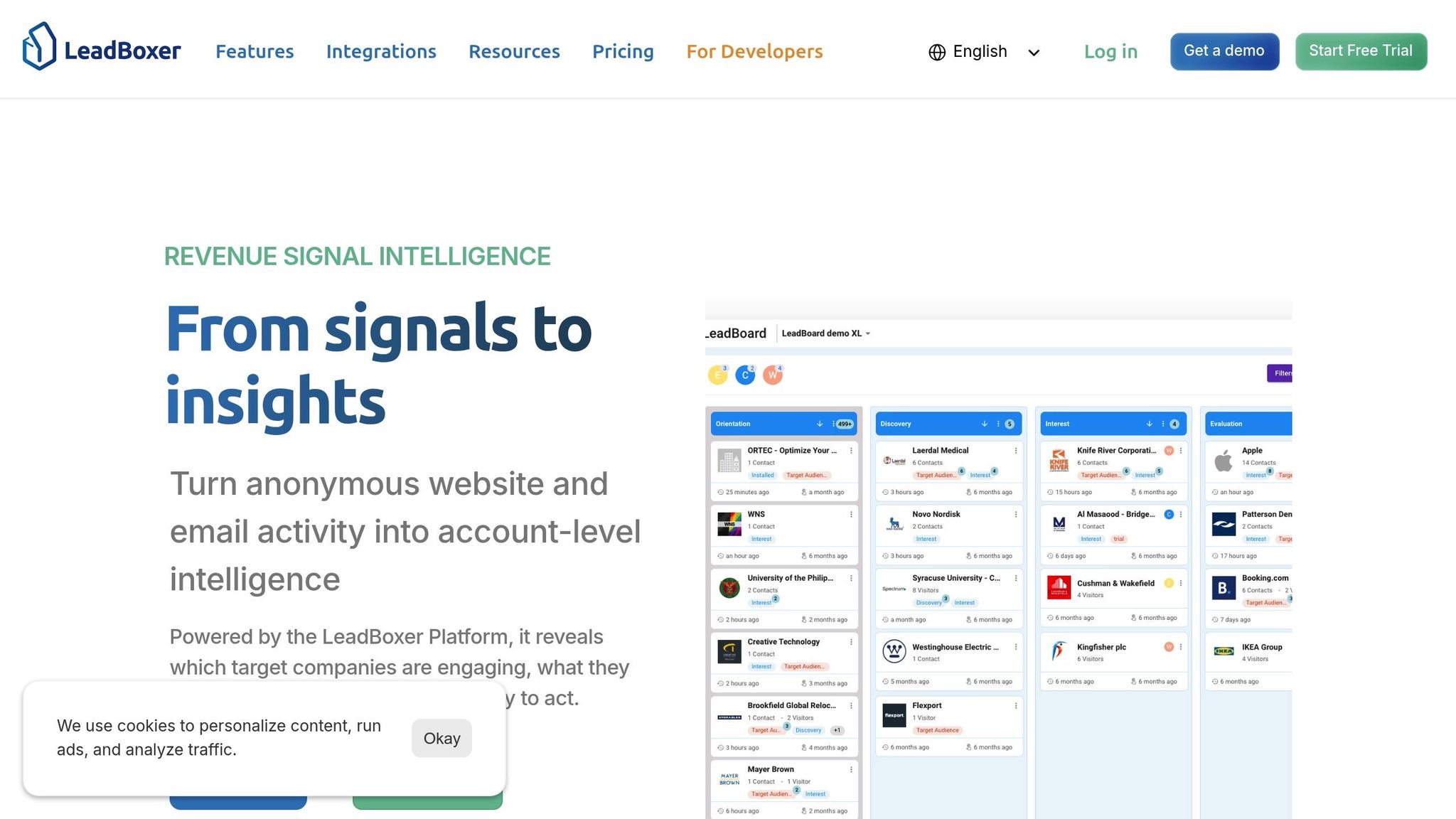
The LeadBoxer API turns raw website traffic into actionable insights by combining IP enrichment, behavioral tracking, and real-time data retrieval. Operating on a pay-per-use model with tiered pricing after an initial free credit allocation, it ensures flexibility for users.
What makes LeadBoxer stand out is its perfect uptime record since 2021, hosted on Amazon Cloudfront. The API delivers responses in just 50–200 milliseconds and supports both IPv4 and IPv6 queries, relying on a proprietary database updated daily. Roughly 20% of this database is refreshed monthly to maintain accuracy. With this reliability, the platform has earned the trust of 60,000 users worldwide.
Visitor interactions are captured using a JavaScript tracking pixel and server-side API calls. These tools log page views, session durations, and engagement patterns without collecting personally identifiable information, ensuring GDPR compliance. The API provides firmographic data, such as company names, industries, locations, employee counts, and estimated revenues.
LeadBoxer also excels in real-time personalization and lead prioritization, identifying both remote workers and traditional corporate networks. You only pay for successfully matched companies, not for unmatched traffic or failed lookups. With integrations spanning over 70 tools like Salesforce, HubSpot, and Google Ads, it aligns seamlessly with existing CRM systems.
Setting Up and Authenticating the LeadBoxer API
Once you’ve grasped what LeadBoxer can do, setting it up is straightforward.
Start by adding a JavaScript tracking pixel to your website - place this snippet just before the closing </body> tag. Authentication is managed through API keys with tenant isolation, ensuring secure data exchanges. Built with a "GDPR first" approach and hosted in the EU, the platform begins capturing IP addresses and mapping them to companies as soon as authentication is complete.
For advanced use cases, there’s a server-side API that enables you to post events from backends, CRM systems, or billing platforms. The API-first design even supports white-label options, letting agencies integrate the technology into their own products. Be sure to tag your online ads, social media posts, and newsletters with UTM parameters - LeadBoxer automatically captures these to add campaign context to lead profiles.
Capturing Visitor Data with LeadBoxer's IP Tracking
LeadBoxer’s IP tracking links IP addresses to companies, revealing geographic locations and firmographic details - even for anonymous visitors. First-party cookies help track returning browsers, consolidating multiple sessions into a single lead profile for a more complete view of each visitor's journey.
The LeadDetail API call retrieves all collected data, including custom fields. If you need immediate access to lead details after the first pageview, it’s recommended to implement a 3-second delay, allowing the system’s datastore to fully populate the profile. Email tracking works similarly, using a 1×1 invisible image to monitor opens and clicks - this feature is typically free under the credit system. By connecting email activity with website behavior, you gain a clearer picture of the buyer journey.
The platform automatically segments leads by factors like industry, company size, and engagement level, helping your sales team focus on high-priority prospects. These segmented leads are visualized in the LeadBoard, where they move through qualification workflows.
With lead data captured and organized, the next step is integrating these insights into your CRM workflows.
Integrating LeadBoxer Data with CRMs and Workflows
LeadBoxer’s API streamlines data export into CRMs like Salesforce, HubSpot, and Pipedrive, eliminating the hassle of manual data entry. This integration transforms raw visitor activity into actionable sales opportunities. Real-time synchronization ensures that sales teams are notified when a new company is identified or a prospect revisits your site. For teams without native integrations, Zapier connections enable automated workflows and notifications.
The structured data format allows filtering and segmentation by criteria such as industry, company size, engagement level, or specific page visits before the data is sent to your CRM. This ensures that your sales team’s attention is directed toward the most promising leads. Studies show that localizing content with IP data can increase conversion rates by 70%, while displaying prices in local currency can boost conversions by 40%.
A practical use case includes enriching chatbot interactions by identifying a visitor’s company before the conversation begins. This enables personalized greetings and more relevant engagement.
Step-by-Step Guide: Converting Traffic Data into Structured Insights
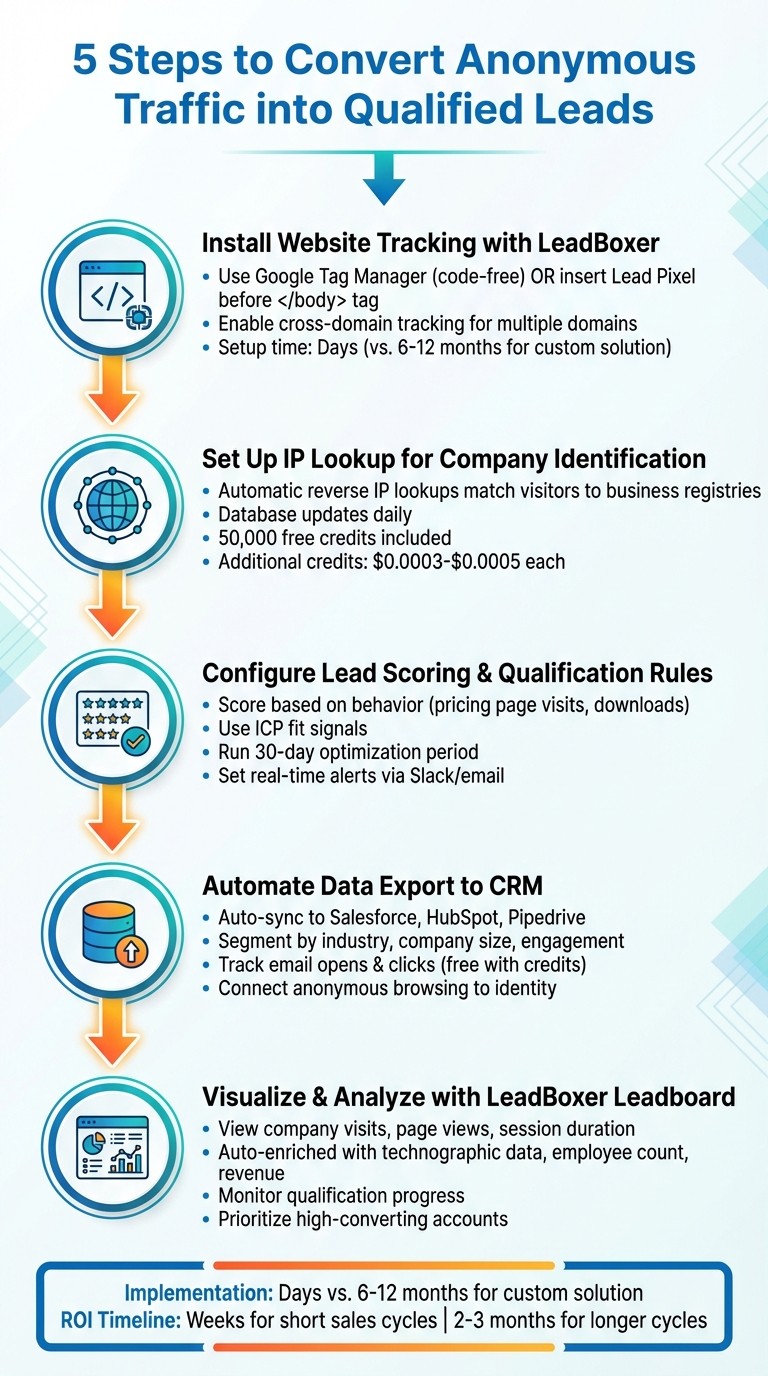
5-Step Process to Convert Anonymous Website Traffic into Structured Lead Data
Turning website traffic into actionable leads doesn’t have to be a long, drawn-out process. With LeadBoxer, you can set up a complete tracking and data enrichment system in just a few days - far quicker than the months it typically takes to build a custom solution from scratch. Here’s how you can get started.
Step 1: Install Website Tracking with LeadBoxer
Setting up tracking is straightforward. Use Google Tag Manager for a code-free implementation across your entire site, or insert the Lead Pixel code directly before the closing </body> tag. If your business spans multiple domains, such as a main site and a customer portal, enable cross-domain tracking with a single pixel. This ensures you capture the full customer journey as visitors navigate between your platforms, giving you a complete picture of their behavior.
Step 2: Set Up IP Lookup for Company Identification
Once tracking is live, the next step is identifying companies through IP lookup. LeadBoxer performs reverse IP lookups, matching visitor IP addresses to business registries. This process happens automatically - no forms required. The database updates daily to maintain accuracy. You’ll receive 50,000 credits for free, with additional credits priced between $0.0005 and $0.0003 depending on volume.
Step 3: Configure Lead Scoring and Qualification Rules
Define custom rules to score visitors based on their behavior and fit with your ideal customer profile. For instance, you might assign higher scores to users who repeatedly visit your pricing page or download key resources like whitepapers. Leverage ICP fit signals to filter for prospects that closely align with your target audience.
Run your scoring model over a 30-day period to fine-tune the weights based on actual conversions. This helps your sales team focus their efforts on high-value prospects. Set up real-time alerts via Slack or email to notify your team when a target account performs high-priority actions, such as revisiting your pricing page multiple times in a week. After configuring scoring, automate lead qualification and data exports to keep your CRM updated in real time.
Step 4: Automate Data Export to Structured Formats
LeadBoxer simplifies data export by automatically sending structured lead information to your CRM or through Zapier. Leads are segmented by key metrics like industry, company size, and engagement levels. You can also apply pre-defined filters to ensure exported data aligns with your qualification criteria.
Track email opens and link clicks for free using the credit system. With form tracking and email link tracking, you can connect a visitor’s anonymous browsing history to their identity once they sign up or click a tracked link. This reveals their entire journey - from the first visit to conversion.
Step 5: Visualize and Analyze Leads with the LeadBoxer Leadboard
With your structured data in place, the Leadboard provides a visual overview of your sales pipeline, making it easier to prioritize follow-ups. Leads are automatically enriched with details like technographic data, employee counts, and revenue estimates, eliminating the need for manual research. The dashboard also displays key metrics like company visits, page views, and session durations to help you craft personalized outreach.
Use the Leadboard to monitor how leads progress through your qualification process and identify trends among high-converting accounts. This insight allows you to refine your targeting and focus resources on the prospects most likely to close.
Best Practices for API Integration and Data Security
Keeping your API integrations secure is critical to protecting your lead generation process. APIs that handle visitor data are often targeted in credential breaches, so strong authentication and access controls are non-negotiable.
Use centralized OAuth 2.0 for identity verification and token management instead of relying on static API keys. Combine this with short-lived JSON Web Tokens (JWT) signed with private keys, and use rotating refresh tokens to limit the impact of token exposure. If you're integrating with external applications, include a specific User-Agent header to identify those integrations. Once these basics are in place, focus on implementing more detailed access controls.
Granular access controls, such as Role-Based Access Control (RBAC) or Attribute-Based Access Control (ABAC), help restrict data access to only what’s necessary. To further safeguard your API, enforce rate limits per token, IP address, or user to prevent scraping and denial-of-service attacks. For instance, many systems cap rate limits at around 100 requests per minute.
Strong authentication and access control measures also help ensure compliance with regulations like GDPR and CCPA. Incorporate server-side privacy checks at the infrastructure level to block unauthorized data processing before it reaches analytics or advertising platforms. Consider hashing or pseudonymizing visitor data, and if you serve European customers, choose an API provider that offers EU-hosted data processing. For example, LeadBoxer employs tenant isolation and API key scoping to prevent cross-customer data leaks.
To stay ahead of potential threats, monitor for unusual behaviors, such as credential stuffing or automated scraping attempts. Keep an up-to-date inventory of your APIs to avoid vulnerabilities from undocumented or outdated endpoints. Lastly, ensure all data transmissions are encrypted using TLS 1.2 or higher. These steps will help keep your lead data secure as it flows through your sales and marketing systems.
Measuring ROI with LeadBoxer Analytics
Understanding the financial impact of turning anonymous website traffic into structured leads is key to optimizing your sales efforts. With LeadBoxer’s analytics dashboard, you can connect website activity directly to revenue. The tool gives you a clear view of how many companies visit your site each month, how engaged they are, and which ones turn into sales opportunities. Start by recording your current traffic volume, conversion rates from cold outreach, and the cost per qualified lead. This baseline helps you map traffic to revenue, creating a foundation for smarter lead prioritization.
LeadBoxer’s Leadboard visualization brings essential data into one interface, showing company names, revenue, employee count, page views, visit duration, and lead scores. This makes it easier to focus on high-value prospects and monitor their journey through your sales funnel. For example, tracking engagement patterns like frequent visits to your pricing page can indicate strong buying intent. By integrating LeadBoxer with your CRM, you can directly link closed deals to leads identified by the platform, allowing you to calculate cost-per-acquisition with precision.
To measure ROI, divide the subscription cost by the number of qualified leads generated each month. Since incremental costs are low, this often results in a favorable cost-per-lead. Additionally, compare how many identified companies convert into sales opportunities versus results from previous cold outreach campaigns to assess improvements in conversion rates.
LeadBoxer also makes reporting straightforward and actionable. You can automate reports in formats like HTML, PDF, or CSV to get regular snapshots of your lead generation efforts. Use saved segments to filter out noise - such as job seekers or existing customers - and focus on traffic that fits your Ideal Customer Profile. This ensures your sales team is chasing genuine revenue opportunities. Real-time alerts further enhance your workflow by notifying you when high-value companies revisit your site, enabling prompt follow-ups.
While businesses often see immediate insights after implementing LeadBoxer, the time to realize ROI depends on your sales cycle length. Companies with shorter B2B sales cycles may notice improvements within weeks as they prioritize hot leads. For longer cycles, it might take two to three months to gather enough conversion data. By turning visitor behavior into measurable outcomes, LeadBoxer connects data collection to revenue generation. You can also validate the platform’s accuracy by tracking how many identified leads respond positively to outreach, ensuring the enrichment data supports reliable ROI calculations.
Conclusion
Converting anonymous website traffic into structured data through APIs tackles a key challenge in B2B lead generation: identifying visitors before they fill out a form. Many prospects conduct research discreetly, and without the right tools, your sales team could miss the chance to engage them while their interest is still fresh. By using APIs for IP lookup, data enrichment, and visitor identification, you can turn raw traffic into actionable insights - revealing company names, firmographic details, and behavioral patterns.
The LeadBoxer API simplifies this process by automating data capture, enrichment, and integration into your CRM and marketing systems. Instead of spending 6 to 12 months and significant engineering resources on building a custom tracking system, LeadBoxer can be implemented in just a few days. With its pay-per-use pricing model - starting with 50,000 free credits and scaling from $0.0005 to $0.0003 per credit - it also helps to keep infrastructure costs low.
Beyond data integration, LeadBoxer offers dynamic lead scoring and workflow automation to ensure your sales team focuses on the most promising prospects. Real-time alerts notify you when companies that match your Ideal Customer Profile revisit your site, enabling timely follow-ups.
This streamlined approach delivers tangible business results. Companies with shorter B2B sales cycles often see improvements within weeks as they prioritize high-quality leads. For those with longer sales cycles, sufficient data for evaluating success typically accumulates within two to three months. By linking visitor activity to revenue through CRM integration, you can calculate precise cost-per-acquisition metrics and justify your investment in structured data.
Combining multiple tracking layers - like IP tracking, cookie-based session monitoring, and form capture - creates detailed visitor profiles. This strategy transforms your website into a consistent source of qualified leads, powering your sales pipeline with prospects identified through the API-driven methods discussed in this guide.
FAQs
How accurate is IP-based company identification?
IP-based company identification can be quite effective, but it’s not without its challenges. Factors like VPN usage, dynamic IP addresses, and gaps in databases can impact accuracy. These issues may lead to lower match rates and reduce reliability. While these tools are helpful, it’s crucial to keep these limitations in mind when using IP-based methods to identify companies.
How do I stay GDPR/CCPA compliant while tracking visitors?
To comply with GDPR and CCPA regulations, prioritize methods that steer clear of gathering personal data without clear consent. Rely on IP-based, cookieless technologies to identify business-related details like company names or industries, ensuring that personal data isn't processed. Maintain transparency by clearly detailing your data collection practices in your privacy policy. Avoid using intrusive techniques such as cookies, device fingerprinting, or cross-site tracking, as these typically require explicit user consent.
What data should I send to my CRM using the API?
Sending enriched lead data to your CRM via the API can transform how you qualify leads and manage sales workflows. By integrating company details, contact information, and behavioral signals, you equip your team with the insights needed to make informed decisions. This approach helps simplify processes and ensures smoother, more effective sales operations.
Related Blog Posts

Versterk uw marketingresultaten met LeadBoxer!
Analyseer campagnes en verkeer, segmenteer op industrie, zoom in op bedrijfsgrootte en filter op locatie. Bekijk uw Toppagina's, topaccounts en vele andere metrics.


LeadBoxer
Leer meer