
Turn Anonymous Traffic into Revenue Signals with One API
Identify anonymous visitors with one API, enrich firmographic and behavioral data, and trigger real-time CRM alerts to boost conversions.
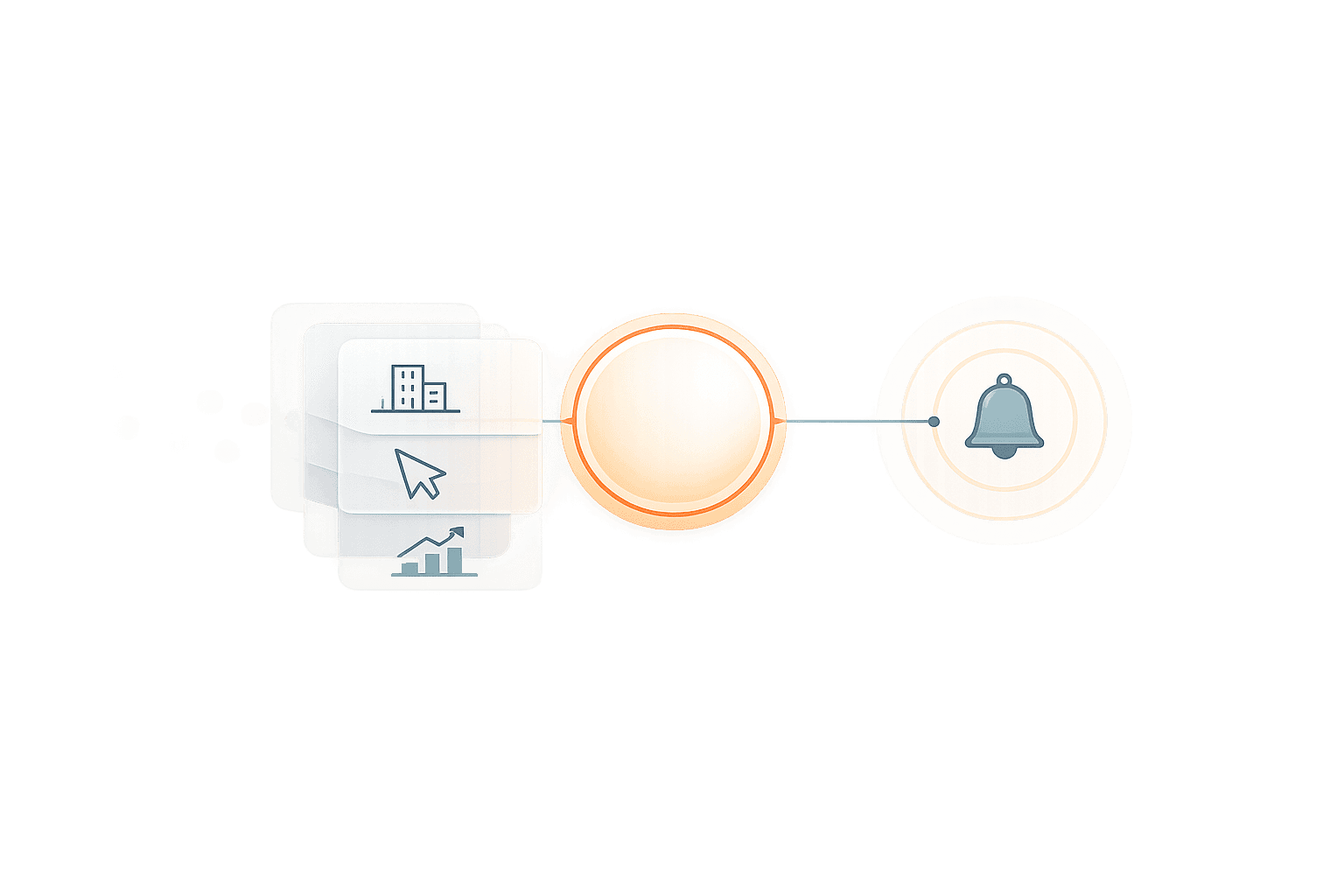
98% of your website visitors leave without identifying themselves. That’s a massive missed opportunity for generating leads and revenue. But with a single API, you can transform anonymous traffic into actionable insights.
Here’s how it works:
Identify Visitors: Use reverse IP lookup and behavioral tracking to reveal which companies are browsing your site.
Enrich Data: Add firmographic details like company size, industry, and contact info to visitor profiles.
Automate Alerts: Notify your sales team in real-time when qualified leads engage with your site.
Boost Conversions: Companies using these tools report up to a 17% increase in inbound conversions and a 67% faster lead response time.
Anonymous Website Traffic Revenue Impact Statistics
Website Visitor Identification: How to de-anonymize and action buying signals from your website
Why Anonymous Traffic Represents Lost Revenue
Understanding the challenges of identifying website visitors highlights how APIs can help turn anonymous traffic into revenue opportunities.
98% of Website Visitors Never Identify Themselves
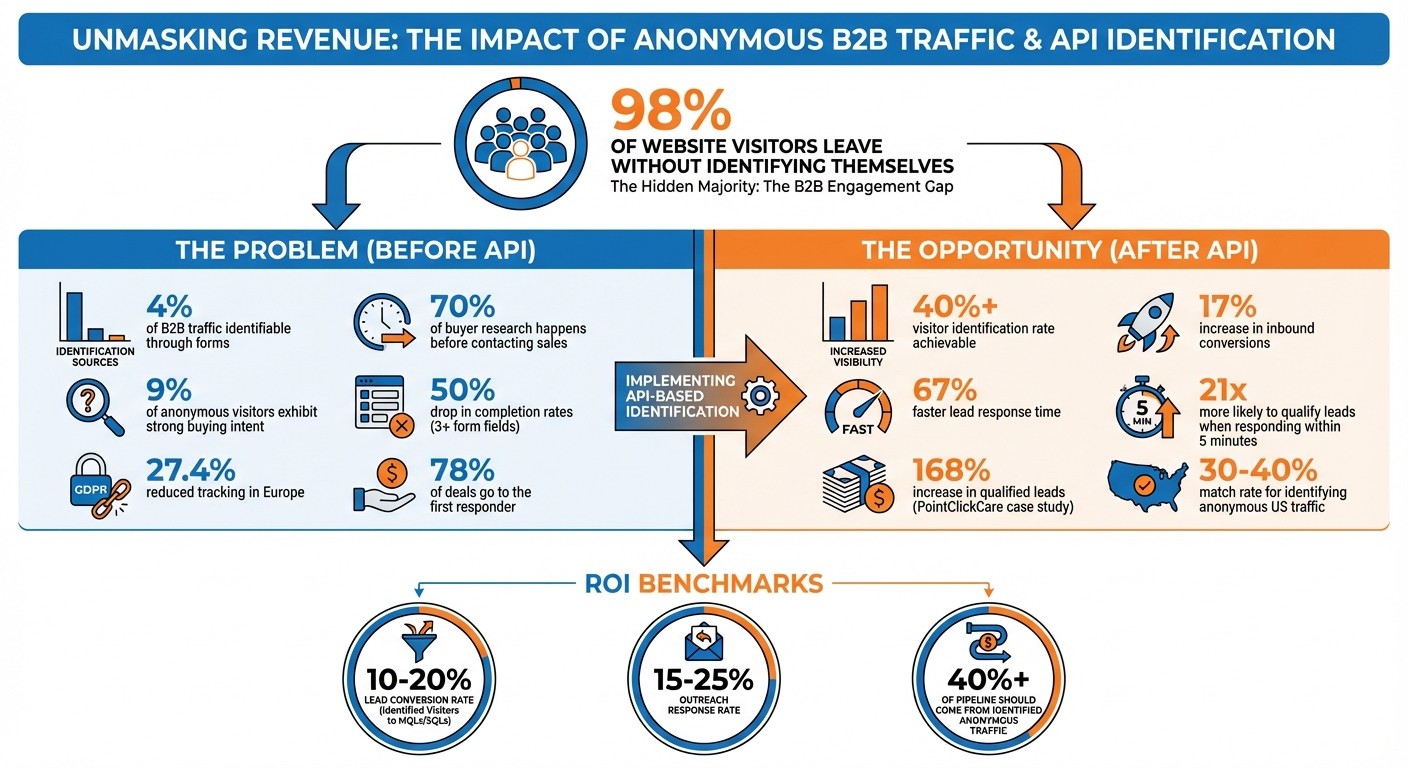
Most analytics tools focus on tracking trends rather than pinpointing individual users. For instance, Google Analytics 4 provides data on page views and traffic sources but doesn't reveal the companies behind those visits. This gap became even more pronounced in February 2020 when Google removed the "Service Provider" and "Network Domain" dimensions, which previously allowed B2B marketers to access company-level information. According to HubSpot, only 4% of B2B traffic is identifiable through form submissions, leaving 97.6% of visitors anonymous. Of these visitors, about 9% exhibit strong buying intent, yet many never complete a form submission to identify themselves.
Several technical and regulatory factors make identification even harder. Ad blockers, privacy-first browsers, automatic cookie deletion, and stringent privacy laws - like GDPR, which reduced tracking by 27.4% in Europe - limit tracking capabilities. In the U.S., privacy laws in twelve states further restrict data collection. On top of that, form abandonment is a significant issue; adding more than three fields to a lead capture form results in a 50% drop in completion rates.
"Google Analytics isn't broken. It was just never designed to do what most marketers need it to do."
Mosharof Sabu, Researcher and Strategic Writer, Neuwark
These limitations create gaps that directly lead to missed revenue opportunities.
The Revenue Cost of Unidentified Visitors
B2B buyers typically complete about 70% of their research before ever contacting a sales team. This means businesses risk losing crucial chances to engage with potential customers during key decision-making phases. Take a website with 50,000 monthly visitors as an example: if 9% of those visitors (4,500) show strong buying intent but only 4% fill out forms, traditional tracking methods capture just 180 leads. That leaves 4,320 high-intent prospects unidentified and untapped.
Real-world examples illustrate the impact of addressing this issue. For instance, in 2022, PointClickCare implemented visitor identification tools to focus on high-intent anonymous traffic. Within just 30 days, they saw a 168% increase in qualified leads. Initially aiming to generate $50,000–$100,000 in annual recurring revenue (ARR) from this initiative, they ultimately attributed over $1 million in incremental ARR to the project in its first year.
"Our goal for ARR from chat for the first year was to generate $50-$100K. In the first year, we were able to attribute over $1M in incremental recurring revenue to Lift AI."
John Walker, Director of Demand Marketing, PointClickCare
The numbers speak for themselves. Identifying anonymous visitors at a 40% match rate could yield nearly 4,000 additional leads for every 10,000 monthly visitors. Teams that use identification and routing automation also report up to a 17% increase in inbound conversions and a 67% faster speed-to-lead. Being the first vendor to respond often makes all the difference - 78% of deals go to the company that responds first. But none of this is possible if you don’t know who’s visiting your site.
How the API Identifies Anonymous Visitors
An API can take anonymous website traffic and turn it into detailed visitor profiles using a mix of reverse IP lookup, behavioral tracking, and data enrichment - no form submissions needed.
Here’s how it works: When someone lands on your website, a lightweight 1x1 tracking pixel and a JavaScript snippet immediately start capturing behavioral data. This includes pageviews, clicks, time spent on the site, and referring URLs. The visitor’s IP address is logged and compared against proprietary databases to identify the organization behind the visit. This reverse IP lookup is particularly valuable for B2B businesses, as it can reveal the company name, industry, and even headquarters location. LeadBoxer has been refining this IP-to-company identification technology for nearly two decades.
To track returning visitors, the system uses first-party cookies to assign a unique User ID. If cookies are blocked or cleared, the API shifts to device fingerprinting. By analyzing browser details like screen resolution and operating system, it creates a consistent digital signature for ongoing tracking.
Identification Methods: IP Resolution and Behavioral Tracking
IP resolution works hand in hand with behavioral analytics to provide a full picture. While IP tracking can pinpoint the company visiting your site, behavioral signals help uncover intent. For example, the API monitors which pages visitors view, how long they stay, and whether they download resources. A visitor returning to your pricing page three times in one week? That’s a clear buying signal.
Another layer of identification comes from form and email tracking. When someone fills out a form or interacts with an email campaign, the API captures their name and email address. The system then retroactively merges all their previous anonymous activity into a single, known lead profile. This means you can see their entire journey - what pages they browsed, which case studies they downloaded, and how often they returned - before they ever identified themselves. This "identity stitching" bridges the gap between anonymous behavior and actionable lead data.
The API organizes all this information into four core elements: Users (Leads), Sessions, Events, and Properties. Properties tied to specific events automatically roll up to the session and user profile, providing a unified view of each lead’s activity.
Data Enrichment Sources and Processes
Once the API identifies a visitor’s company through IP resolution, it enriches the profile with additional firmographic and technographic details. This step fills in key information like revenue range, employee count, industry classification, and even the year the company was founded. It also collects technographic data, such as which software and technologies the organization uses, as well as social media profiles and primary contact information.
Here’s the workflow in action:
Capture: Behavioral signals are collected via the tracking pixel.
Resolution: IP addresses are matched to organizations.
Lookup: Additional attributes are pulled from enrichment databases.
Identity Stitching: Anonymous profiles are merged with known lead records.
This entire process happens in real-time, so sales teams can act on fresh insights while prospects are still engaged.
Enrichment Category | Data Fields Extracted |
|---|---|
Firmographics | Company name, industry, employee range, revenue range, year founded, business specialties |
Location & Contact | City, state, country, postal code, primary phone, company email |
Technographics | Technologies in use by the organization |
Social Profiles | LinkedIn, Facebook, and Twitter/X URLs |
Network Intelligence | ISP, network provider, IP range, and confidence scores |
All this enriched data is delivered as a single JSON response called a "Lead Object." This centralized view includes session data, device intelligence, geolocation, and firmographic details, making it easy to integrate into your CRM. With webhooks, you can automate B2B lead scoring updates and trigger alerts when high-intent accounts visit your site, keeping your sales team one step ahead.
Step-by-Step API Implementation Guide
Turning anonymous website traffic into revenue starts with a well-planned API setup. The process is broken into three main steps: adding tracking scripts, integrating your tools, and setting up automation to turn visitor behavior into actionable sales opportunities.
Installing Tracking Scripts and Setting Up Data Enrichment
The first step involves adding a tracking script, often called the Lead Pixel, to your site. This script monitors visitor behavior and identifies companies interacting with your site. Without it, the system won’t collect or process any data. Here's the script you’ll need:
Place this snippet right before the closing </body> tag on your site. If you're using platforms like WordPress, Drupal, or Google Tag Manager, you can simplify the process by using their dedicated plugins.
Once the pixel is active, head to your dashboard to configure data enrichment settings. This is where you decide what kind of information the system should gather, such as company size, industry, technologies used, or key decision-maker contacts. For instance, if you’re targeting manufacturing companies with 50+ employees, set those filters early to avoid collecting irrelevant data.
For more advanced needs, you can define an ot_onload() function before the script. This lets you attach metadata - like account IDs or subscription levels - to the first pageview, immediately linking anonymous visitors to your existing customer records.
After setting up tracking and enrichment, connect this data to your CRM to enable real-time lead management.
Connecting to Your CRM and Marketing Tools
The next step is integrating the API with your CRM and marketing tools. Use OAuth or webhooks to sync visitor data as it comes in. Map fields like company name, industry, and employee count to their corresponding fields in your CRM. This ensures that identified visitors are automatically added as leads in real time.
You can also set up notifications through tools like Slack or email. For example, if a high-priority visitor - like a Fortune 500 company - spends ten minutes on your pricing page, the system can automatically create or update a lead in your CRM. It will enrich the record with firmographic details and notify the assigned sales rep immediately. Teams that use this kind of integration have reported a 67% faster response time to leads and a fivefold reduction in misrouted leads.
Once your tools are connected, the next step is to prioritize leads and automate alerts.
Setting Up Lead Scoring and Alert Automation
Lead scoring helps you rank visitors based on how well they fit your ideal customer profile and how engaged they are with your site. You can set scoring rules using four main criteria:
Range: Numeric values like visit count or time spent on site.
Match: Specific field matches, such as industry or location.
Exist: Presence of critical data, like contact information.
Boost: High-value actions, such as downloading a case study or viewing a demo page.
For example, you might assign 10 points for companies in your target industry, 5 points for each visit to your pricing page, and 20 points for downloading a case study. When a visitor’s score reaches a certain threshold - say, 80 points - the system can trigger alerts.
Set up these alerts to notify the right sales reps based on account assignments or territories. Include key details in the notification, like the company name, pages viewed, time spent on the site, and contact information for decision-makers. These automated workflows turn casual browsing into immediate sales opportunities, giving your team the edge they need to act quickly.
Converting Identified Data Into Revenue
Turn enriched visitor data into revenue by focusing on lead prioritization and delivering highly targeted outreach.
Scoring and Prioritizing Leads by Intent
Not all website visitors are created equal - some are casually browsing, while others are actively comparing solutions. Intent scoring helps you figure out who’s who by combining firmographic details with behavioral insights.
Firmographic data like company size, revenue, industry, and technology stack helps you determine if a lead aligns with your target audience. Behavioral signals - such as visits to your pricing page, repeat sessions, or downloading resources - reveal how serious they are. For instance, a visitor from a 500-employee company in your ideal industry who has checked your pricing page multiple times in one week is likely far more engaged than a one-time visitor from a smaller, less relevant company.
"The first seller to contact a decision-maker after a trigger event is five times more likely to win the deal than those who arrive later." - Growth List
Create a scoring system to quantify intent. For example:
10 points for viewing a pricing page
20 points for downloading a case study
50 points for requesting a demo
Recent actions should carry more weight. Once a lead hits a predefined score - say 80 points - it’s time to automatically send them to your sales team. Timing is everything: if a high-intent visitor from a key account is active, your team should know about it within minutes. Businesses using this method report 47% better conversion rates and 43% larger deal sizes.
Segmenting Audiences and Personalizing Outreach
After scoring leads, segmentation allows you to craft outreach strategies that resonate. Group leads based on firmographics, behavior, geography, or technology stack. This ensures your messaging is relevant and that leads are routed to the right sales team.
For example, segmenting by geography and industry allows for localized follow-ups. Technographic data - like a prospect’s current tech stack - lets you tailor your pitch to highlight how your solution complements their existing tools.
Develop tiered workflows to align outreach efforts with intent levels:
Tier 1 leads (e.g., those with job changes, new funding, or multiple high-intent actions) should get a response within 24-48 hours.
Tier 2 leads with moderate engagement or hiring trends can enter a [priority nurture campaign using lead nurturing software](https://www.leadboxer.com/blog/the-12-best-lead-nurturing-software-options-for-your-business).
Tier 3 leads showing less urgency (e.g., casual browsing) might be better suited for long-term marketing automation.
Personalization is a game-changer. Emails that include specific details - like the pages a lead visited or the content they downloaded - see an 18% response rate, compared to just 3.4% for generic cold emails. For example: "I noticed you spent time reviewing our API documentation and pricing page this week. Are you currently evaluating solutions for lead identification?"
You can also set up automated chat triggers for repeat visits from high-intent leads. Engaging proactively while a visitor is still on your site significantly boosts the chances of conversion. Finally, sync all this enriched data back to your CRM. This ensures your sales team has the full picture - company size, revenue, technology stack, and browsing history - without needing to dig for it manually.
Tracking Performance: Metrics That Matter
To understand your API's impact on revenue and lead generation, focus on key metrics like identification rate, lead conversion, and ROI. These measurements offer a structured way to assess performance and refine strategies where needed.
Visitor Identification Rate and Lead Conversion
The identification rate reveals how effectively your API converts anonymous visitors into identified contacts. While 97%–98% of visitors typically remain anonymous, a robust API should identify over 40% of them. If you're falling short, it might be time to revisit your data enrichment sources or tweak your tracking script setup.
For lead conversion, aim for a 10%–20% rate - this measures how many identified visitors progress to become Marketing Qualified Leads (MQLs) or Sales Qualified Leads (SQLs). Additionally, your outreach efforts should generate a 15%–25% response rate. Identified visitors tend to perform far better than traditional cold leads.
Speed is equally crucial. The faster your sales team reaches out to high-intent leads (like those visiting your pricing page), the better your chances of success. Reaching out within 5 minutes can boost qualification odds by 21 times, while a 60-minute response still offers a 7x improvement. Real-time alerts can help ensure your team acts quickly.
Calculating ROI and Sales Response Time
Speed isn't just about lead qualification - it also drives revenue. A key metric here is pipeline attribution, which tracks the total dollar value of opportunities generated from visitors identified by your API. Strive for at least 40% of your sales pipeline to originate from previously anonymous traffic. Beyond that, monitor closed deals, overall revenue, and engagement scoring trends. This data allows for more precise lead targeting based on firmographic profiles. Higher engagement among identified prospects usually signals stronger intent and better conversion potential.
Source attribution is another crucial metric to track. By analyzing which marketing channels - like organic search, paid ads, or social media - bring in the most identifiable and high-value visitors, you can refine your marketing strategy and allocate your budget more effectively.
Metric | Formula | Benchmark |
|---|---|---|
Identification Rate | Identified Visitors / Total Visitors | 40%+ |
Lead Conversion | MQLs or SQLs / Identified Visitors | 10–20% |
Response Rate | Responses / Total Outreach Attempts | 15–25% |
Pipeline Attributed | $ Revenue from Identified Visitors / Total Pipeline | 40%+ |
Conclusion
Converting anonymous website traffic into revenue doesn’t have to mean overhauling your entire tech stack. With a single API, you can identify the 97%–98% of visitors who browse your product but never submit a form. By enriching this data with firmographic and behavioral insights, you can instantly route high-intent leads to your sales team.
Here’s how it works: deploy tracking scripts, set up data enrichment, integrate with your CRM, and configure automated lead scoring and notifications. With this system in place, your sales team can follow up with prospects who visit your pricing page within 5 minutes. This quick response makes them 21x more likely to qualify as leads.
"You can't close deals with traffic - you need contacts."
Stan Rymkiewicz, Head of Growth at Default
Choose the integration method that works best for your setup, whether through front-end tracking or server-side events. This allows you to capture visitor data efficiently, without adding extra complexity. Lead scoring models can then help prioritize prospects based on their activity and engagement levels.
The results speak for themselves. Companies using automated identification and routing experience 67% faster speed-to-lead and a 17% increase in inbound conversions. With the right API, you can achieve a 30%–40% match rate for identifying anonymous US traffic at the individual level. Notably, the first vendor to respond to a lead wins the deal 78% of the time.
To ensure success, test your setup in a controlled environment, validate your endpoints, and confirm seamless CRM integration to eliminate manual data entry. Once live, monitor metrics like identification rates, lead conversion rates, and pipeline attribution. These insights will help you refine your system and maximize your ROI by mapping the B2B customer journey.
FAQs
Is this compliant with U.S. privacy laws and GDPR?
This solution aligns with U.S. privacy laws and GDPR by employing IP resolution, behavioral analytics, and AI-driven enrichment. By relying on lawful methods and avoiding the use of personal data, it ensures compliance with privacy regulations while still enabling effective data enrichment.
What match rate should I expect for identifying companies and people?
When it comes to identifying companies, you can typically expect a match rate of 80–90%. For identifying individual people, the match rate tends to be a bit lower, though it remains meaningful. These results can vary based on factors such as the quality of the data and the behavior patterns of your visitors.
How quickly can I connect this to my CRM and trigger alerts?
You can link LeadBoxer to your CRM and set up alerts with ease. The platform enables real-time workflows, allowing you to enhance lead data and seamlessly transfer it to systems like Salesforce or HubSpot. By using the API with your key and dataset ID, the integration and alert configuration process takes just minutes. Thanks to event tracking, notifications can be triggered almost immediately when certain conditions are met.
Related Blog Posts

Supercharge your marketing results with LeadBoxer!
Analyze campaigns and traffic, segement by industry, drilldown on company size and filter by location. See your Top pages, top accounts, and many other metrics.


LeadBoxer
Get started