
How to Build AI Sales Forecasting with APIs
Build API-driven AI sales forecasts by combining CRM and behavioral data, training models, and deploying predictions into your CRM.

AI sales forecasting is transforming how businesses predict revenue. Unlike manual methods that are often inaccurate and biased, AI leverages real-time data and machine learning to achieve prediction accuracy of 85-95%. APIs make this process seamless by connecting CRMs, behavioral signals, and machine learning models, enabling continuous updates and eliminating outdated snapshots.
Key Takeaways:
Why AI Forecasting? It replaces guesswork with data-driven insights, reducing errors by 30-50% and boosting revenue by up to 18%.
Role of APIs: APIs unify data from CRMs, emails, and behavioral signals, creating a reliable foundation for accurate forecasting.
Tools Needed: Python, machine learning libraries (e.g., XGBoost, Prophet), and platforms like AWS Lambda or LeadBoxer for data integration.
Process Overview: Collect data, preprocess it, train models, and integrate predictions into CRMs for actionable insights.
Benefits for SaaS: Predict churn, upsell opportunities, and improve resource allocation while cutting manual tasks by 60%.
By following a structured process and leveraging tools like LeadBoxer, businesses can build a scalable, API-driven forecasting system that improves decision-making and revenue planning.
Building Realtime End to End Sales Forecasting AI from Scratch
Prerequisites for Building AI Sales Forecasting Solutions
Before diving into the technicalities of API-driven sales forecasting, it's crucial to establish a solid technical foundation and ensure access to reliable data. Poor data quality can have a massive impact, costing businesses up to 31% of their annual revenue.
Required Tools and Technologies
To train models effectively, use Python 3.11. Key machine learning libraries include XGBoost for regression tasks and time-series tools like Facebook Prophet or ARIMA for handling seasonal trends. For more complex sales cycles, consider LSTM networks, which are ideal for capturing long-term dependencies.
For integration, Node.js is an excellent choice for building serverless functions with platforms like AWS Lambda or Vercel. These functions can connect your CRM systems with AI APIs using webhooks. Additionally, APIs like LeadBoxer and CRM platforms (e.g., HubSpot, Salesforce, Pipedrive) can sync real-time pipeline and behavioral data. For high-dimensional data storage, explore vector databases like Pinecone or Weaviate, and for training large models, consider GPU-accelerated instances such as NVIDIA H100 or H200.
Understanding Data Sources and API Integration
Successful forecasting models rely on three primary data types:
Historical sales data: Includes revenue and transaction timelines.
CRM data: Covers deal sizes, sales cycle durations, and stage transitions.
Behavioral signals: Tracks actions like email opens, website visits, and session durations.
Behavioral signals are particularly important because traditional forecasts often overlook what buyers actually do, instead relying on subjective input from sales reps.
Using LeadBoxer's APIs, you can enrich lead data with firmographic details and behavioral scoring based on specific user actions like visiting certain URLs or triggering "boost" events. To ensure smooth integration, standardize data formatting across CRMs and configure webhooks for real-time updates.
Once your data sources and integration strategies are in place, you can move on to setting up your development environment.
Setting Up the Development Environment
Begin by installing Python and its core machine learning libraries:
scikit-learn: For regression tasks and scaling.
pandas and NumPy: For data manipulation.
joblib: For saving models and avoiding retraining with every API call.
Store sensitive credentials securely in a .env file. Your environment should support REST API calls and webhook listeners. Use frameworks like Express.js (for Node.js) or Flask blueprints (for Python) to handle real-time signals from CRMs. Finally, containerize your setup with Docker to ensure consistency between development and production environments while allowing for smooth scaling.
Tool Category | Recommended Technologies | Purpose |
|---|---|---|
Languages | Python, Node.js, TypeScript | Backend logic and API integration |
ML Frameworks | scikit-learn, TensorFlow, XGBoost | Model training and deal scoring |
Data Handling | Pandas, NumPy | Data cleaning and aggregation |
Deployment | Docker, AWS Lambda, Vercel | Scalable hosting and serverless functions |
API Integration | REST, Webhooks, Unified.to | Sourcing data from CRMs and behavioral tools |
Step-by-Step Guide to Building AI Sales Forecasting
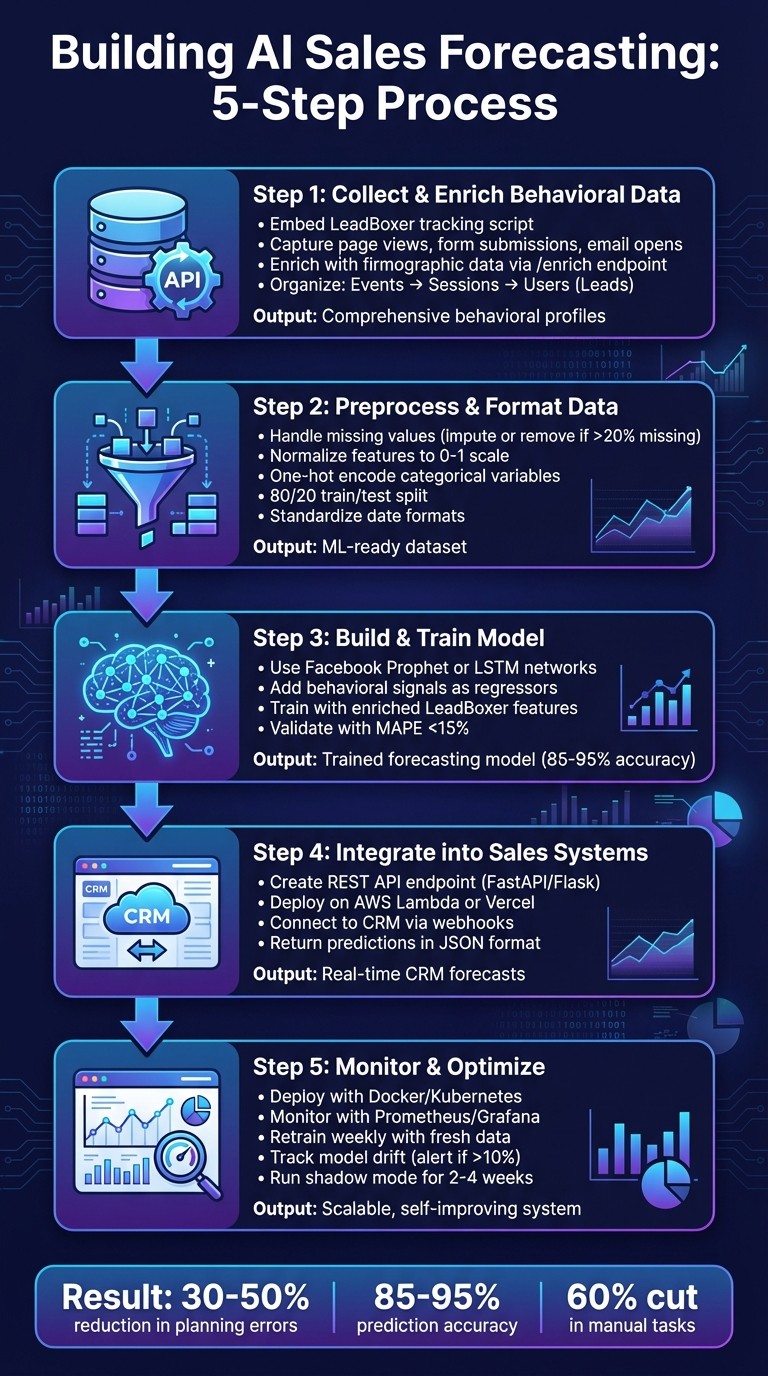
5-Step AI Sales Forecasting Implementation Process with APIs
Creating an AI-driven sales forecasting system involves a series of well-defined steps, blending data collection, machine learning, and seamless integration into your sales workflow. Here's a breakdown of the process, from gathering behavioral data to deploying actionable predictions.
Step 1: Collect and Enrich Behavioral Data Using LeadBoxer APIs
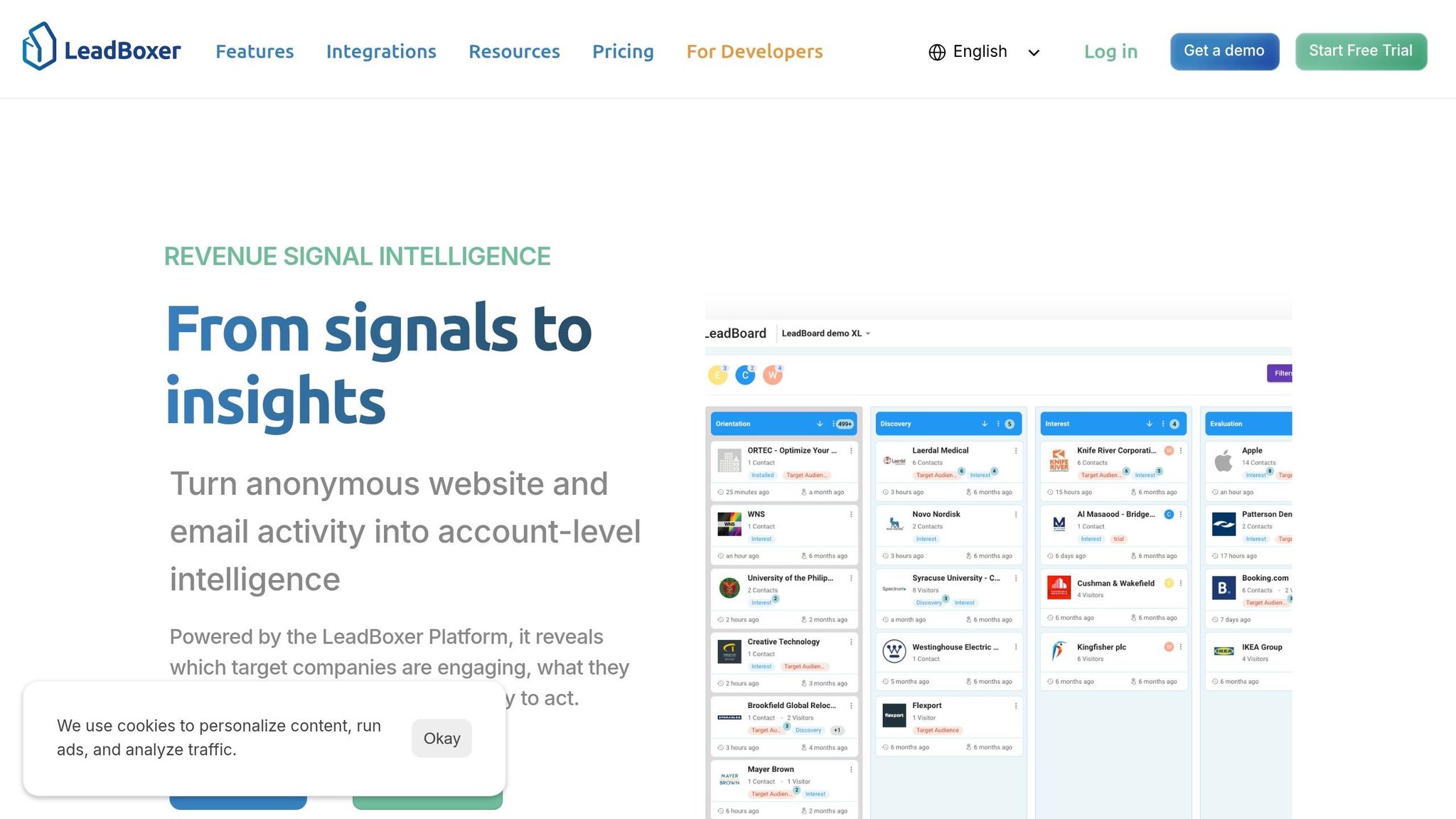
Start by gathering actionable behavioral data with LeadBoxer APIs. Begin by obtaining your LeadBoxer API key and embedding the tracking script into your website's HTML head section:
This script captures essential behavioral events like page views, form submissions, and email opens. To track email interactions, use UTM parameters or custom events within your campaigns. Then, enrich your data by sending a POST request to the /enrich endpoint with visitor IP addresses. This step resolves anonymous traffic into identifiable companies and contacts, adding firmographic details like revenue, industry, and company size.
LeadBoxer organizes data hierarchically: Events are tied to Sessions, and Sessions belong to Users (Leads). Properties from events automatically cascade to session and user profiles. To create a comprehensive behavioral profile for AI training, sequence your API requests - fetch Users first, then Sessions, and finally Events.
For backend activities like sign-ups or subscription changes, submit events directly using the log.leadboxer.com endpoint. Attach custom properties (e.g., industry, stage, or cta_clicked) to events, ensuring they are stored in the user profile for future retrieval. Once data is collected, preprocess and format it for machine learning.
Step 2: Preprocess and Format Data for Machine Learning
Evaluate the quality of your data using tools like Pandas. Identify and address missing values - impute numerical fields with the median and categorical fields with the mode, or remove records with more than 20% missing information.
Normalize features like session duration to a 0–1 scale, and encode categorical variables using one-hot encoding (e.g., for industry types). Structure your dataset in a time-series format, including columns for the date (MM/DD/YYYY), enriched features (like company revenue in USD), and the target variable (historical sales). Split the dataset into training and testing sets, using an 80/20 ratio.
Leverage LeadBoxer’s scoring engine to create numerical features for your models. For example, use criteria like Range (e.g., pageviews), Match (specific conditions), Exist (field presence), and Boost (URL signals). Standardize date formats with Python’s pd.to_datetime() and apply feature engineering techniques, like calculating rolling averages, to enhance your dataset.
Step 3: Build and Train the Forecasting Model
For time-series forecasting, use Facebook Prophet. Import the library and initialize the model:
Fit the model using your enriched dataset and add LeadBoxer intent signals as regressors with m.add_regressor('intent_score'). This step ensures behavioral data directly influences predictions, improving accuracy.
For more complex patterns, explore LSTM (Long Short-Term Memory) networks using TensorFlow or Keras. Structure LeadBoxer features into sequences (timesteps, features) and train the model with Mean Squared Error (MSE) loss over multiple epochs:
Validate your model’s performance using metrics like Mean Absolute Percentage Error (MAPE), aiming for less than 15% to ensure reliable forecasts. Once trained, integrate your model into your sales systems.
Step 4: Integrate Forecasting Outputs into Sales Systems
Create a RESTful API endpoint using frameworks like FastAPI or Flask to handle JSON payloads. The API should run inference on the forecasting model and return predictions in USD format:
Deploy the API on scalable platforms like AWS Lambda or Vercel. Then, integrate the predictions into your CRM using webhooks or official CRM APIs. For Salesforce, use the Bulk API to update Opportunity fields, or HubSpot’s Deals API for real-time updates. Ensure data integrity by mapping LeadBoxer properties (e.g., user ID, email) to equivalent CRM fields and implementing strong authentication measures like API keys.
Step 5: Monitor, Optimize, and Scale the System
Deploy your forecasting system using tools like Docker for containerization or Kubernetes for orchestration, ensuring scalability. Use observability tools like Prometheus or Grafana to monitor key metrics such as forecast accuracy (e.g., Mean Absolute Error) and inference latency (targeting under one second).
Set up automated pipelines with tools like Airflow to retrain your models weekly using fresh LeadBoxer data. Monitor for significant model drift - like changes exceeding 10% - and adjust for regional trends by incorporating local economic data.
Optimize API calls by batching enrichments and managing quotas effectively. Track performance indicators like conversion rates and revenue impact to measure the system’s value. Before fully adopting the system, run it in shadow mode for 2–4 weeks alongside your current processes to fine-tune and compare results.
Best Practices for AI Sales Forecasting with APIs
Once you've set up and implemented your AI sales forecasting system, the following practices can help you get the most out of your API-driven approach.
Ensuring Data Quality and Relevance
Poor data quality is a costly issue, with organizations losing over $5 million annually because of it. It's also a top concern for 43% of COOs. To ensure your API-driven forecasting system operates optimally, focus on six key dimensions of data quality: Accuracy (how well the data reflects reality), Completeness (ensuring all required fields are filled), Consistency (uniformity across systems), Timeliness (how current the data is), Uniqueness (avoiding duplicates), and Validity (adhering to the correct format).
To combat data decay - especially in B2B databases - set up automation to re-verify records older than 90 days using APIs. For deduplication, use fuzzy matching to catch variations like "Acme Corp" versus "Acme Corporation", which basic matching might miss. Standardize API outputs before saving them to your database - for example, convert "United States" and "US" into ISO 3166 codes. Additionally, CRM validation rules and dropdown menus can prevent bad data from entering your system in the first place.
"Data quality is a revenue problem, not an IT problem." - Chris P., Writer, Crustdata
To improve API performance, use exponential backoff for handling "429 Too Many Requests" errors. Combine short-term caching (e.g., Redis) with long-term caching (e.g., Postgres) for a two-tier caching strategy. Modern enrichment APIs can now verify lead data with up to 97% accuracy.
Customizing Forecast Models for Your Business Needs
Different businesses require different forecasting models. For small-to-medium businesses (SMBs) and high-volume sales, time-series models like ARIMA or Prophet work well. On the other hand, complex enterprise sales benefit from machine learning models like Random Forest or XGBoost, which can analyze multi-stakeholder engagement.
One effective strategy is dual-probability modeling, which predicts two probabilities for each deal: the likelihood of winning and the probability of closing within a specific timeframe. This approach helps avoid revenue slippage by aligning forecasts with actual sales cycles. Keep deal types - such as new business versus expansions - separate in your models, as they have different sales cycles and risk factors.
Adjust your forecasting horizon based on your goals. For example:
Use monthly horizons for short-term sales execution.
Opt for quarterly horizons for resource planning.
Choose 12–36 month horizons for long-term strategy.
Companies that rely on data-driven sales decisions typically see a 15%–20% improvement in ROI. To keep your models relevant, retrain them quarterly to account for changes in market trends, pricing, or team structure. For greater accuracy, consider combining different model types, like tree-based algorithms with regression models, to balance their strengths and weaknesses.
"The technology works best when combined with sales leaders' experience and intuition, providing data-driven insights that enable better decision-making." - CaptivateIQ
Using LeadBoxer Features for Better Forecasting
LeadBoxer offers tools that fit seamlessly into an API-driven ecosystem. Its scoring engine evaluates leads based on behavior, such as visit frequency, specific actions, and high-value signals. Use the Track API to capture events like whitepaper downloads, pricing page visits, or webinar sign-ups, which can serve as critical inputs for your forecasting models.
Through identity stitching, LeadBoxer merges anonymous visitor data with known lead records once an identifier is available. This provides a complete historical view of buyer behavior, improving forecast accuracy. The Lookup API enriches lead data with firmographic details, such as industry, company size, and revenue, allowing your models to weigh leads based on their Ideal Customer Profile (ICP) fit.
To maintain up-to-date models, automate data exports using the App API, which can send qualified lead data to external AI training environments or CRM systems. LeadBoxer organizes data hierarchically - events belong to sessions, and sessions belong to leads - enabling AI models to analyze patterns from individual actions to long-term buyer journeys. You can also use custom name/value pairs to tailor event data to your specific sales processes.
These LeadBoxer features help refine your forecasting models while ensuring smooth integration with CRM systems.
Conclusion
Summary of Steps to Build AI Sales Forecasting
AI sales forecasting powered by APIs replaces guesswork with data-driven insights. The process is straightforward: start by gathering behavioral data using tracking APIs, enrich it with firmographic information, and prepare it for machine learning. Train your forecasting model, integrate the results into your sales systems, and continuously update the data to reflect market changes. Modern tools provide two critical probabilities - win likelihood and expected closing month - offering greater cash flow predictability. For example, incorporating signals like scroll depth and email engagement can increase prediction accuracy by 28%.
"Forecasting built on opinions misses. Forecasting built on evidence compounds." - Spotlight.ai
The architecture looks like this: CRM → Webhook → Serverless → AI API → CRM. This seamless data flow ensures your models reflect real buyer behaviors rather than outdated CRM records. Companies using AI forecasting have cut planning errors by 30-50%, achieving accuracy rates of 85-95%, compared to the 60-75% range of traditional methods.
By following these steps, you not only create a reliable forecasting system but also gain a competitive edge, especially when using platforms like LeadBoxer.
Benefits of Using LeadBoxer for API-Driven Forecasting
LeadBoxer streamlines the entire forecasting process with a unified data pipeline that automatically captures, enriches, and scores behavioral data. Its identity stitching feature connects anonymous activity with known leads, providing a complete view of buyer behavior without manual intervention. The scoring engine evaluates engagement using methods like Range, Match, Exist, and Boost, offering valuable inputs for machine learning models.
The REST-based API architecture is designed for easy integration with serverless tools like AWS Lambda or Vercel, automating the forecasting workflow. Instead of juggling separate systems for tracking, enrichment, and scoring, LeadBoxer combines them into one platform. This approach saves development time and eliminates the common issue of fragmented data.
With these tools, developers can confidently tackle implementation, knowing they have a solid foundation.
Next Steps for Developers and SaaS Companies
Start by auditing your CRM to ensure you have at least 24 months of clean sales data and clearly defined sales stages, including criteria for "closed-won" deals. Run a pilot program with a single team or region to test your model's performance before expanding it organization-wide.
Integrate behavioral scoring early on - relying solely on traditional CRM fields can overlook critical intent signals that improve forecast accuracy. Set up automated retraining schedules, either weekly or monthly, to keep your models aligned with evolving market conditions and prevent data drift. By 2027, 75% of top-performing sales organizations are expected to adopt AI-driven forecasting as a standard practice. The gap between companies using evidence-based forecasting and those relying on intuition will only grow. Accurate revenue forecasting is no longer optional; it's a decisive advantage, and the tools to achieve it are already within reach.
FAQs
What’s the minimum data I need to start forecasting?
To kick off AI-driven sales forecasting, you'll need a few essential ingredients: historical sales data, current pipeline details, and buyer behavior signals. These inputs form the backbone of your forecasting model. Key data points include past deal outcomes, how deals progress through your pipeline, and engagement metrics, such as buyer interactions.
By combining CRM data with behavioral signals, you can significantly improve prediction accuracy. AI models use this blend of information to analyze patterns and deliver forecasts that are far more precise. Just make sure your dataset is well-organized and packed with relevant details to get the most reliable results.
How do I handle missing or messy CRM and tracking data?
Managing missing or messy CRM and tracking data is crucial for accurate AI sales forecasting. Start by cleaning and enriching your data - use APIs to fill in gaps and fix inconsistencies. Regular maintenance is key: remove duplicates, standardize formats, and validate entries to keep your database in top shape.
Implement error-handling mechanisms to address sudden spikes in data flow, ensuring your system remains stable. Finally, make it a habit to monitor data quality regularly. Tackling the root causes of inaccuracies will not only lead to more reliable forecasts but also enhance the overall precision of your sales predictions.
How often should I retrain and redeploy the model?
Retraining and redeploying AI sales forecasting models is crucial for maintaining their accuracy and keeping up with evolving data patterns. Experts recommend retraining these models at least every quarter or whenever there are notable changes in data or market conditions. The ideal frequency depends on factors like the amount of data available and the pace of sales fluctuations, but the goal is always to ensure the model remains dependable and aligned with current trends.
Related Blog Posts

Supercharge your marketing results with LeadBoxer!
Analyze campaigns and traffic, segement by industry, drilldown on company size and filter by location. See your Top pages, top accounts, and many other metrics.


LeadBoxer
Get started