IP to Company Lookup: How to Identify Your Website Visitors
Identify company visitors from IPs, enrich with firmographics, score intent, and route high-value accounts while filtering weak matches.

Most B2B website visitors never fill out a form, but their company may still be visible. In many cases, I can use IP-to-company lookup to see which business visited a site, score that visit, and send the account to sales. That said, this only works well for traffic from company networks. Remote work, VPNs, mobile traffic, and shared ISP connections cut match rates fast.
Here’s the short version:
IP-to-company lookup identifies a company, not a person
It works by matching a public IP address to known business network data
I can then add firmographic data like company name, industry, size, and location
The best use is to score account intent based on pages viewed and repeat visits
It is less reliable for home networks, VPNs, mobile carriers, and small businesses
Most teams should filter weak matches before sending alerts to sales
Common benchmarks include:
15% to 35% identification rate overall
30% to 50%ICP match rate among identified accounts
10% to 20% high-intent visit rate
15% to 25% outreach response rate
A few numbers stand out. About 98% of B2B visitors leave without converting, and many buyers do 60% to 70% of research before talking to a vendor. So if I can identify even part of that traffic at the account level, I get a better shot at routing intent early.

IP-to-Company Lookup: Identification Reliability by Visitor Context
How to get company information from the IP address within Matomo? The IPtoCompany plugin
Quick comparison
Situation | What I can usually learn | Reliability |
|---|---|---|
Company office network | Company name, industry, size, location | High |
Remote worker on VPN | Often just the VPN provider | Low |
Remote worker at home | Usually just the ISP | Low |
Mobile network | Usually just the carrier | Very low |
Co-working space | May show the workspace provider | Low to medium |
So the main takeaway is simple: IP-to-company lookup is a company identification tool, not a person identification tool. If I pair it with page-level behavior, CRM routing, and clean filtering, supported by workflow automation, it can turn anonymous traffic into sales-ready account signals without overreading weak matches.
How IP-to-Company Lookup Works
When someone visits your site, your tracking script logs the visitor's public IP address and sends it, along with session events like page views and clicks, to the identification platform in real time. The match only works if that IP belongs to a public business network.
Public IPs, Ownership Records, and Network Data
Private IPs stay inside a local network, so they can't be used for outside lookup. Only public IPs assigned by an ISP or a corporate network can be matched to a company.
Larger companies often own dedicated blocks of public IP addresses registered under the company name. Mid-market firms may also have dedicated ranges, although some still sit on shared ISP blocks. Smaller businesses often use shared or residential ISP addresses, which makes identification much harder.
The Data Sources Behind Company Identification
IP-to-company matching pulls from Regional Internet Registry records along with BGP and ASN data to connect IP ranges to organizations, including companies running on cloud infrastructure. These platforms keep updating those maps and sharpen them with first-party signals like form fills, email clicks, and logins.
Once the IP is mapped, the platform can turn that data into a usable account profile.
From Website Visit to Account Profile in LeadBoxer
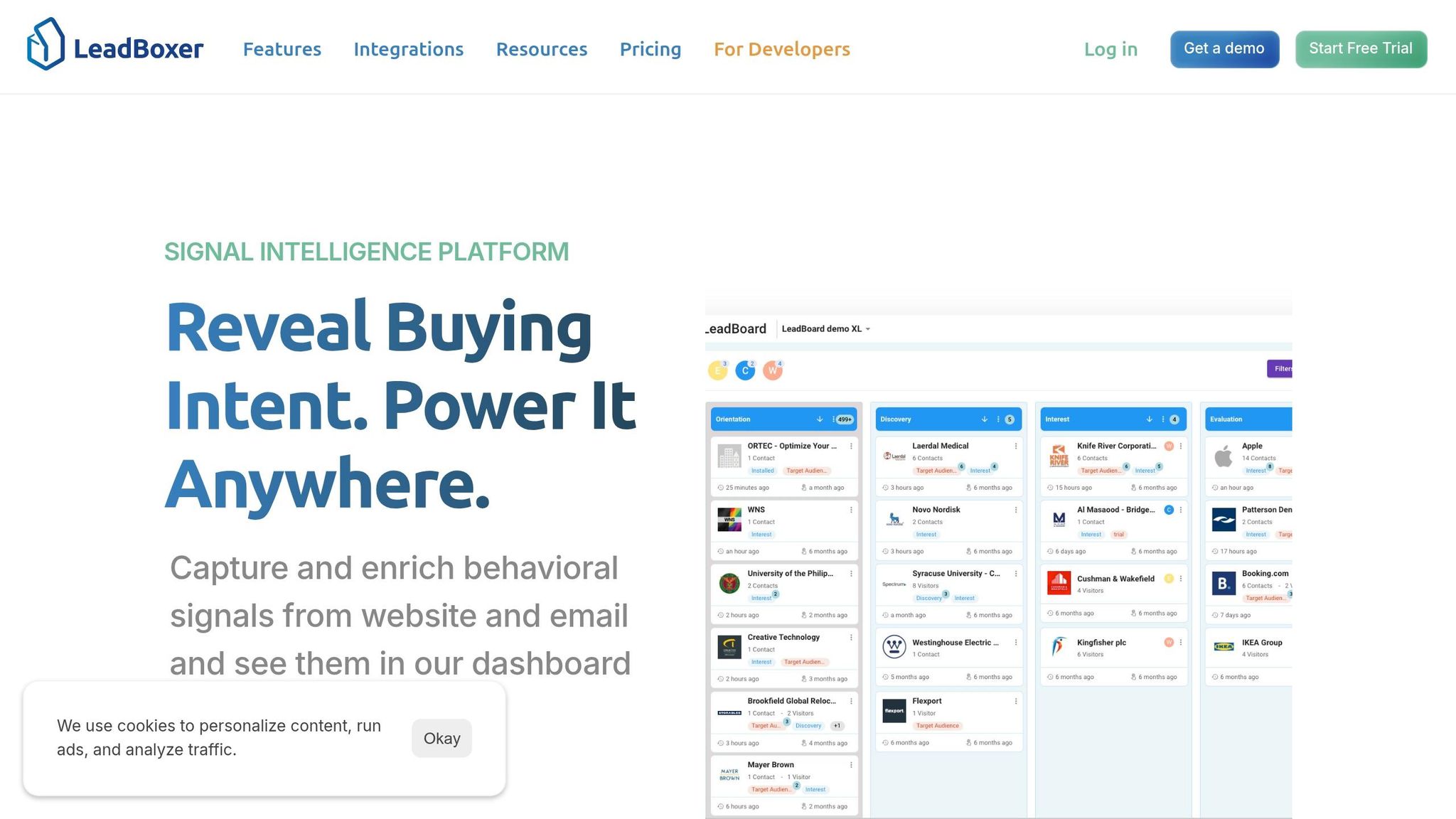
When LeadBoxer's tracking script records a visit, it checks the IP against business IP-range databases in real time. If the IP falls inside a registered corporate range, it resolves to an organization. From there, enrichment adds firmographic details like company name, industry, size, and location to build a usable account profile.
Visits from the same company IP or network are grouped into one account profile. That gives you a clearer view of how that organization is interacting with your site across sessions. If a visitor later fills out a form, logs in, or clicks an email, LeadBoxer connects the account to a known contact.
What You Can and Cannot Learn From a Visitor IP
IP-to-company lookup can give you usable account data, but only when the IP match is clean. That’s the whole game: figuring out which matches are solid enough to score, route, and act on.
A match on its own isn’t the finish line. The harder part is deciding whether that match is trustworthy enough to use.
Company Insights You Can Usually Extract
When the match works, you can often pull in details like company name, domain, industry, employee count, revenue range, HQ location, and connection type. Some tools also show tech-stack and funding signals.
That sounds useful, and it is. But there’s a catch.
An IP match points to an account, not a person. If you want to tie that account to an individual, you still need help from cookies, form fills, or logins.
And even then, the profile only helps if the IP maps cleanly to a business network.
Where IP Identification Becomes Unreliable
This is where things get messy.
Remote and hybrid work are the biggest limits. When someone visits your site from home, their traffic usually resolves to a residential ISP, not their employer. Estimates suggest that 35–60% of B2B knowledge-worker traffic now comes from residential IPs. In plain English: a big chunk of traffic simply won’t resolve to a company.
VPNs create a similar issue. Corporate VPN services like Zscaler or Cisco AnyConnect route traffic through their own IP ranges, so the identification tool sees the VPN provider instead of the company behind it. Mobile traffic is just as murky because carrier IP pools are shared across millions of users and change often.
Small businesses are another steady blind spot. If they don’t have dedicated, registered IP ranges, they often sit inside ISP blocks shared with residential users. That can push identification rates down to 5–15%. Large enterprises are a different story. If they’re on known corporate networks, match rates for U.S.-based traffic can hit 60–78%.
Visitor Context vs. Identification Reliability: Quick Reference Table
Visitor Context | Identification Reliability | Typical Data Available |
|---|---|---|
Corporate Office Network | High | Company name, domain, industry, size, revenue, HQ location |
Remote Worker (Corporate VPN) | Very Low | Resolves to VPN provider instead of employer |
Remote Worker (No VPN) | Low | Resolves to residential ISP instead of employer |
Mobile Network | Very Low | Resolves to mobile carrier |
Co-working Space | Moderate/Low | May resolve to the co-working provider rather than the tenant |
Data Center / Hosting | Low | Resolves to cloud provider and may indicate bot or scraper traffic |
Before you send accounts to sales, filter out ISP, mobile, and data-center traffic. That helps your team focus on the cleaner matches - the ones worth qualifying, routing, and using for outreach.
How to Use Identified Accounts for Lead Generation
What you’re left with is a smaller set of company matches, but one that’s far easier to act on. The next step is simple: figure out which accounts deserve attention from sales.
Qualify and Prioritize Accounts Using Firmographics and Intent
Once a company match is clean, you need to decide if it fits by visualizing your lead qualification results.
Start by checking each identified account against your Ideal Customer Profile (ICP): industry, employee count, geography, and revenue band. This quick filter helps remove out-of-profile accounts fast.
Then look at behavior. That’s usually what separates a warm account from a cold one. A company that visits your blog once is not the same as one that lands on your pricing page three times in a week. LeadBoxer can score accounts by combining profile fit with behavior signals like repeat visits, time on site, and specific page views. That makes it easier to spot accounts worth a sales follow-up. For example, a company that viewed your demo page more than once and spent time on your case studies sends a much stronger signal than one that bounced from your homepage.
It also helps to build a target-account watchlist. Upload your named target accounts into LeadBoxer, and you can get an alert the moment one of them appears on your site, even if no one fills out a form. For enterprise deals, where buying cycles are long, those early signs can matter a lot.
After scoring, push the account into the tools your team already uses.
Route Account Data Into CRM, Sales Alerts, and Internal Workflows
Identification only matters if the data ends up somewhere your team can use. Send identified company data into your CRM as a new or enriched account record, along with firmographic and behavior context, whether you use Salesforce, HubSpot, or Pipedrive.
You can also route high-intent visits into Slack or email alerts so reps can act while the signal is still fresh. Timing matters here. Reaching out within 24 to 48 hours helps you catch the intent signal while it’s still warm. You can layer in territory and account ownership rules too, so the right rep gets the right alert without manual triage.
The pages a company views can shape the message before a rep even makes contact. Pricing pages often point to buyers or finance. API docs usually suggest technical evaluators. That kind of context gives outreach a much better starting point.
IP-to-Company Use Cases: What Works and What to Watch For
These are four of the most common ways teams turn identified accounts into pipeline signals.
Use Case | Primary Benefit | Key Limitation | Best Practice |
|---|---|---|---|
On-site Personalization | Tailored content or banners can improve conversion | Requires fast enrichment to avoid lag | Use company size and industry to surface relevant case studies |
Outbound Sales Research | Replaces cold outreach with warm, context-aware conversations | Identifies the company, not the individual | Reference the topic the company was researching, not the visit itself |
Account-Based Advertising | Focuses ad spend on accounts already showing active interest | Match rates vary by region and remote-work prevalence | Sync identified account lists to LinkedIn or Google Ads for retargeting |
Account-Level Reporting | Shows marketing's contribution to pipeline from anonymous traffic | VPNs and mobile networks can reduce accuracy | Use a shared engagement view to align sales and marketing teams |
Use these filters before you measure tracking, scoring, and routing performance.
Setting Up and Measuring IP-to-Company Lookup With LeadBoxer
Set Up Tracking, Enrichment, and Scoring
Add the tracking script to every page you want to monitor. Full-site coverage matters because scoring is only as good as the data behind it. Untracked pages cannot be scored.
Give more weight to pricing, demo, docs, and comparison pages than blog or careers pages. That helps keep your sales feed centered on accounts that are more likely to be in buying mode, not just browsing.
After you define your events, connect LeadBoxer's REST APIs so enriched account data flows into your CRM or dashboard. Speed matters here. If that data sits in limbo, sales and marketing can't act on it when interest is still hot.
Before launch, update your privacy notice and use a consent banner for EU traffic. Also exclude internal IPs and known customer domains so your team doesn't end up chasing its own traffic.
Track Performance and Improve Match Quality Over Time
Once tracking is live, watch match rates to spot weak sources and fine-tune scoring.
Metric | What It Measures | Benchmark |
|---|---|---|
Identification Rate | % of total traffic resolved to a company | 15–35% |
ICP Match Rate | % of identified accounts matching your ICP | 30–50% |
High-Intent Visit Rate | Identified companies viewing pricing or demo pages | 10–20% |
Outreach Response Rate | Replies to outreach triggered by visitor identification | 15–25% |
These numbers tell you if identified accounts are reaching the right team early enough to open real pipeline.
Noisy alerts are a fast way to lose trust, so tighten ICP filters and lead qualification before sending anything to sales. Suppress traffic tied to residential ISPs so those visits don't land in your sales queue. It also helps to review match rates and routing rules every week, then adjust which page types trigger alerts as more behavior data comes in.
Use these metrics to decide when to tighten filters, change scoring, or reroute alerts.
Conclusion: What IP-to-Company Lookup Does Well and Where It Stops
IP-to-company lookup handles one job well: it turns anonymous B2B traffic into known accounts. It works best when you pair it with firmographic enrichment and behavioral scoring. Match rates for U.S. enterprise-focused sites can reach 60–78%, while European B2B traffic usually lands around 30–40%. There are limits, though. Remote work and VPN use keep pushing those numbers down.
The goal is simple: identify the right companies, score intent, and route them into action fast.
FAQs
How accurate is IP-to-company lookup?
Accuracy comes down to two things: how good the provider’s database is and what kind of connection the visitor is using.
For general B2B traffic, successful identification usually lands between 10% and 45%. That number can climb to 60%–78% for sites that go after large enterprises with dedicated, static IP ranges.
When the system does make a match, it’s usually right 75%–90% of the time.
There’s a catch, though. Accuracy tends to fall for remote workers, mobile users, VPNs, and residential ISPs. In those cases, the employer can be hidden, or the system may show only the ISP name instead of the company.
Can I identify remote or mobile visitors?
Usually, no.
A standard reverse IP lookup often won’t tell you where someone works. That’s because remote and mobile traffic usually points to a residential ISP, a mobile carrier, or a VPN service, not a specific employer.
You can get closer by combining IP data with other signals. For example:
Device fingerprinting can help link visits from the same browser or device
Identity graph matching can connect session data to known people or accounts
CRM data, email clicks, and form submissions can tie anonymous sessions back to known contacts
Put simply: IP data alone is often too thin. It works better when you pair it with session, contact, and behavior data.
What should sales do with identified accounts?
Sales teams should use identified accounts to turn cold outreach into warmer, more relevant conversations grounded in actual research behavior.
Use firmographic data and page-level intent signals to:
prioritize high-potential leads
personalize outreach
identify decision-makers
time follow-up
This approach can also help re-engage stalled pipeline accounts and spot whitespace accounts for territory planning.
Related Blog Posts
Build on the LeadBoxer Platform
APIs for tracking, company identification, enrichment and scoring. The first 25,000 credits are free.