Lead Enrichment APIs: What They Are and Why You Need One
Turn thin leads into sales-ready profiles with real-time or batch enrichment, improving scoring, routing, and CRM data.

Most inbound leads are too thin to use. If I only get a name and work email, I can’t score, route, or personalize that lead well.
Here’s the short answer: a lead enrichment API takes a basic lead record and adds missing company, contact, and tool-stack data in real time or in batch. That helps teams decide who the lead is, whether the account fits, and what to do next.
If I had to sum up the article in a few points, it would be this:
What it is: an API that turns inputs like a work email, company domain, or LinkedIn URL into a richer lead profile
What it adds: company size, industry, revenue range, job title, seniority, phone, LinkedIn URL, and sometimes tech stack or buying signals
How it works: input → match → fill missing fields → return JSON → sync to CRM or marketing tools
When to use it: real-time for form fills and signups; batch for CRM cleanup and backfills
Why teams use it:better lead scoring, faster routing, cleaner CRM data, and more relevant outreach
What to check before buying: data accuracy, match rate, compliance, uptime, response time, and ease of setup
A few numbers stand out. The article notes that only 27% of leads are usually qualified before scoring or enrichment, sales reps spend just 28% of their week selling, and B2B data decays by about 22.5% to 30% per year. That’s why enrichment matters: it cuts research time and gives teams data they can act on right away.
One simple example says a single email like john@acmeco.com can turn into a profile with a name, title, company, size, industry, tech stack, and a recent company signal such as funding. That’s the difference between a raw record and a sales-ready lead.
If I were reading this article to make a decision, my takeaway would be clear: use a lead enrichment API when missing lead data slows down scoring, routing, reporting, or outreach. Start with one workflow, map only the fields you need, test match rates on a small sample, and avoid overwriting good CRM data with blanks.
Below, the article explains those points in plain terms, with examples for SaaS, RevOps, product, and developer teams.
The 5 Best Data Enrichment APIs In 2026
What a Lead Enrichment API Returns
A work email, company domain, or LinkedIn URL can turn into a 20- to 50-plus-field profile in under 500 ms.
Firmographic, Contact, and Technographic Fields
The returned data usually falls into three buckets. Firmographic fields describe the company: legal name, domain, industry, employee count, estimated revenue range, headquarters location, funding stage, and year founded. Contact fields describe the person: full name, current job title, department, seniority level, verified work email, direct-dial phone number, and LinkedIn profile URL. Technographic fields go a step further. They show which tools the company uses, such as Salesforce for CRM, HubSpot for marketing automation, or Google Analytics for web tracking.
Why does that matter? Because it tells you what’s already in place. That makes integration easier and gives sales and marketing a better shot at personalizing outreach fast.
Data Category | Common Returned Fields | B2B Use Case |
|---|---|---|
Firmographic | Company name, employee count, revenue range, HQ, funding stage | ICP fit scoring and territory routing |
Contact | Full name, job title, seniority, verified email, phone, LinkedIn URL | Personalized outreach and decision-maker identification |
Technographic | CRM, analytics tools, marketing automation software | Better integration or account-fit opportunities |
Behavioral and Intent Context
Some platforms also return behavioral and intent signals, like recent visits, hiring spikes, executive hires, tech adoption, and funding announcements. Those signals turn a static profile into a timing cue for driving sales. Instead of just telling you who the lead is, the data can help show when it makes sense to act.
Next, the question is how the API matches and syncs that data.
Example: One Work Email Becomes a Full Lead Profile
Here’s what that looks like in a single record. A contact submits a form with only their work email: john@acmeco.com. The API resolves that input against its data graph and returns a full profile:
Full name: John Carter
Title: Head of Product
Seniority: Director+
Company: Acme Co
Size: 200 employees
Industry: SaaS / Fintech
Tech stack: Salesforce, HubSpot, AWS
Recent signal: Raised $20M Series B last month
Sales gets the decision-maker. Marketing gets fit context. RevOps can route and score the lead right away.
How Lead Enrichment APIs Work
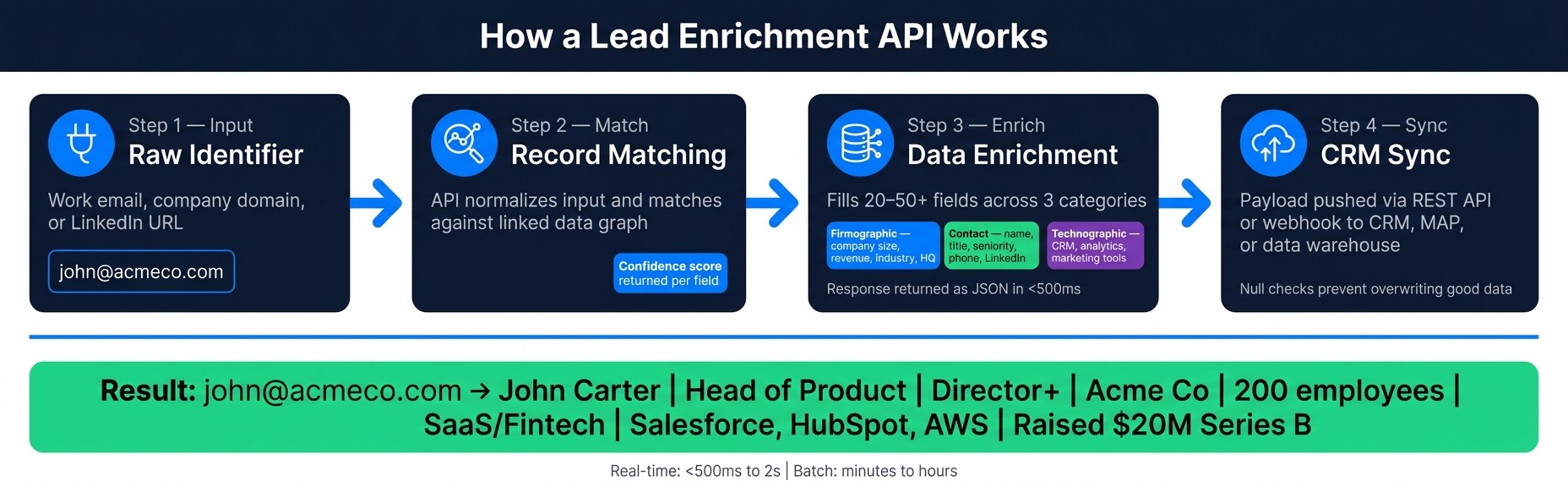
How Lead Enrichment APIs Work: Input to CRM in 4 Steps
Input, Matching, Enrichment, and Sync
When a lead enters your system, the API cleans up the identifier, matches it to a person or company, fills in missing fields, and sends the result to your tools.
It starts with whatever identifier you have on hand - a work email, company domain, or LinkedIn URL - and normalizes that input. Then comes record matching. The API checks that cleaned input against linked records to find the right person or company. After that, it pulls from multiple sources to fill in the gaps. The response usually comes back as JSON, often with confidence scores for each field.
So a raw identifier turns into lead data you can use.
The last step is sync. That payload is pushed into your CRM, marketing automation platform, or data warehouse, usually through a REST API or webhook that updates the existing record with new attributes.
Real-Time vs. Batch Enrichment
Once enrichment is in place, the next call is when to run it. Use real-time for live actions. Use batch for backfills and cleanup.
Real-time enrichment runs when something happens right now - a new signup, a chat conversation, or a form fill. It usually returns data in under 500 ms to 2 seconds, which is fast enough to shape the next step before the person leaves the page.
Batch enrichment is more of a scheduled job. You run it nightly, weekly, or as a one-time backfill across a big set of records. It works asynchronously, so jobs can take minutes or hours based on volume. This is a good fit for CRM cleanup, filling gaps in old data, or getting a list ready for a campaign.
Mode | Trigger | Latency | Best For |
|---|---|---|---|
Real-Time | Form fill, signup, website visit | <500ms to 2 seconds | Routing, scoring, personalization |
Batch | Scheduled job, list import, CRM refresh | Minutes to hours | CRM cleanup, backfills, list prep |
Developer Implementation with LeadBoxer
From a developer's point of view, most enrichment APIs use a simple REST setup. You authenticate with a Bearer token in the Authorization header, send a request with an identifier like an email, domain, or LinkedIn URL, and get back a JSON response with nested person-level and company-level objects.
For event-driven setups, webhooks fit event-driven workflows. Instead of polling for updates over and over, the provider sends data to your endpoint when something changes - like a job title change or a new funding round. That helps keep records current without nonstop polling.
LeadBoxer fits into this flow as the system that tracks activity, enriches records, and pushes updates downstream. A few implementation habits make a big difference:
Use a cache layer like Redis with a 24–72 hour TTL so you don't make the same call again and again for one domain
Add exponential backoff when you hit rate limits so retries don't stack up at the same time
Run null checks before syncing to your CRM so you don't overwrite good data with empty fields
That delivery layer is what makes enriched data useful for data-driven lead qualification, routing, and CRM updates - which the next section gets into.
Why B2B Teams Use Lead Enrichment APIs
Once enrichment data starts flowing into your stack, the payoff shows up fast: scoring gets sharper, routing gets faster, cleanup gets easier, and account priority becomes a lot clearer. In practice, B2B teams use enrichment to score, route, personalize, and collect high-quality sales leads on autopilot. That matters because sales professionals spend only 28% of their week actually selling. The rest gets eaten up by manual research and admin work.
Lead Scoring, Routing, and Personalization
Scoring based only on CRM data leaves out a big part of the picture. If you're only looking at form fills and on-site actions, you're missing outside signals that can tell you whether an account is a good match and whether it's likely to buy.
When you add data points like employee count, industry, job title, revenue range, and tech stack, scoring starts to reflect fit and intent, not just activity.
Routing gets easier too. Instead of having someone sort inbound leads by hand, enrichment can send leads to the right rep the moment a form is submitted. Enterprise accounts can go one way, SMB accounts another. No delay, no guesswork.
Personalization improves for the same reason. If a rep can see recent funding, company size, or the tools a prospect already uses, outreach has something concrete to build on. That kind of context helps teams avoid bland, generic messaging and can drive 2–3x higher response rates compared to generic outreach.
CRM Cleanup and Better Reporting
B2B contact data doesn't stay clean for long. It degrades at roughly 22.5% to 30% per year. People switch jobs, companies change names, fields go missing, and duplicate records pile up.
Enrichment helps fix that by:
standardizing company names
filling in missing fields
cutting down on duplicates
That has a direct effect on reporting. If your segmentation fields are messy, your attribution model is messy too. But when fields are clean and consistent, reports start to line up with what's happening in the pipeline. You can trust a closed-won-by-industry report when the industry field is filled in and standardized across every record.
Identifying High-Intent Accounts with LeadBoxer
A lot of website visitors never fill out a form. That's where LeadBoxer comes in. It can map anonymous visits to real companies, then add firmographic and behavioral context to those accounts.
The signal that matters most is fit plus intent. A company that matches your ICP and has visited your pricing page is not the same as a random lead that signed up cold. One looks like a company that's actively weighing options. The other may just be early noise.
LeadBoxer helps surface that fit-plus-readiness signal so sales teams can focus outreach on accounts that appear to be in market now, not just accounts that happened to submit a form.
That kind of prioritization works best when enrichment rules, sync timing, and field mappings are set upfront.
How to Choose and Roll Out a Lead Enrichment API
What to Check Before You Implement
Once you understand what enrichment gives you and how it works, the next step is picking an API that fits your workflow.
Before you commit, do a quick audit of your current lead data. Export 1,000 recent leads and check how complete your key fields are: job title, industry, company size, and revenue range. That baseline shows where enrichment needs to do the heaviest lifting.
Then compare vendors on the five things that matter once the API is live:
Criteria | Green Flag | Red Flag |
|---|---|---|
Data Accuracy | Live SMTP checks; updated daily or weekly | Pattern-matched guesses; rarely refreshed |
Match Rate | 70–90% for company domains | Under 40% for your specific ICP |
Compliance | No published compliance policy | |
Reliability | 99.9% uptime; response under 500ms | Frequent downtime; slow responses |
Integration | Clean JSON output; native CRM connectors | Requires heavy custom development |
One formula is worth keeping in mind: Data Utility = (Relevance × Timeliness) / Integration Friction. A huge database sounds good on paper, but stale data or messy setup can turn it into dead weight. The right choice depends on your lead volume, your ICP, and whether you need real-time lookups, batch processing, or data that stays current over time.
A Simple Rollout Plan for SaaS and RevOps Teams
Start small. Then expand after the data is clean and the match rate holds up.
Roll out enrichment where incomplete leads slow your team down the most: inbound forms, signups, and sales-qualified workflows. Don't enrich your entire CRM on day one. Start with one high-value workflow, like inbound demo requests or new product signups, and make that work first.
A simple rollout usually looks like this:
Define your Minimum Viable Data Set: Pick the 5–10 fields that trigger action, such as job title, company size, or tech stack. Leave the rest alone for now.
Run a test batch: Take 100 leads that match your ICP and run them through the API before going live. Look at actual match rates, not vendor claims.
Map fields with care and validate before sync: Fill only empty fields. Then check email deliverability, domain match, and title relevance before anything updates in the CRM.
Expand after quality checks out: When match rates and field completion look good in the pilot workflow, extend enrichment to more segments.
LeadBoxer sits between capture and activation. It combines website tracking, company identification, enrichment, and intent scoring, so scoring and routing rules begin with clean, consistent data. That gives your CRM and automation tools a dependable base for action.
Conclusion: Incomplete Leads Waste Time, Enriched Leads Drive Action
A lead enrichment API turns thin lead records into signals your team can use for scoring, routing, and outreach.
The effects downstream are hard to ignore. Scoring reflects actual fit and intent. Routing happens on its own. CRM records stay cleaner for longer. And high-intent accounts - the ones that match your ICP and are actively researching - get surfaced before they cool off.
LeadBoxer's API-first model is built for this workflow. It brings together website tracking, company identification, data enrichment, and intent scoring in one platform, so B2B SaaS teams and developers don't need to stitch multiple tools together just to see who's engaging and whether that account is worth pursuing.
FAQs
How accurate is lead enrichment data?
Lead enrichment data accuracy depends less on how big a provider’s database is and more on how strong its verification layer is.
Here’s why: B2B data decays by about 30% per year. So if a platform leans on stale, pre-calculated records, the data can go out of date fast. Stronger APIs deal with this by verifying data in real time instead of serving up old snapshots.
Reliable systems also go beyond simple lookups. They use live checks, cross-reference data from multiple sources, and validate key fields to keep details like job titles, email addresses, and phone numbers current, rather than returning best-guess matches.
What fields should I enrich first?
Start with a close look at your CRM data. The goal is simple: find the missing details in the deals that have gone best in the past.
For most B2B teams, the best place to begin is with a small set of fields:
Seniority level
Job function
Company size
Industry
Years of experience
These fields help with lead scoring, routing, and personalization. Once you have that base in place, you can layer in technographics, intent signals, and social profiles.
How do I avoid bad CRM updates?
Use automated validation and quality checks before data hits your CRM. A lead enrichment API with a verification layer, such as live SMTP checks for emails and HLR lookups for phone numbers, helps make sure only accurate data gets added.
You should also set automated rules for format and range checks, handle conflicts with custom logic, and use an asynchronous pipeline to deduplicate records and filter low-quality data before updates go through.
Related Blog Posts
Build on the LeadBoxer Platform
APIs for tracking, company identification, enrichment and scoring. The first 25,000 credits are free.