LeadBoxer Platform for Website Visitor Identification and IP-to-Company Matching
Identify anonymous B2B site visitors via IP-to-company matching, email and form tracking; enrich profiles and feed CRM for real-time lead scoring and alerts.

LeadBoxer helps B2B companies identify anonymous website visitors and track their engagement. By using IP-to-company matching, email tracking, and form submissions, it connects visitor activity to real companies and individuals. This data reveals which businesses are researching your offerings and provides actionable insights for sales and marketing teams. Key features include:
IP-to-Company Matching: Links visitor IP addresses to company data like name, size, revenue, and location.
Visitor and Email Tracking: Tracks website activity, email engagement, and custom events to build detailed lead profiles.
Lead Scoring and Alerts: Prioritizes high-intent leads and notifies teams in real-time about key actions.
CRM Integration: Syncs enriched lead data with tools like Salesforce and HubSpot.
Privacy Compliance: Focuses on company-level data to align with regulations like GDPR and CCPA.
This platform simplifies lead generation, improves follow-ups, and enhances workflows by automating data capture, lead scoring, and notifications. Designed for U.S. teams, it offers flexible implementation options, real-time metrics, and pricing plans starting at $205/month.
Core Features of the LeadBoxer Platform
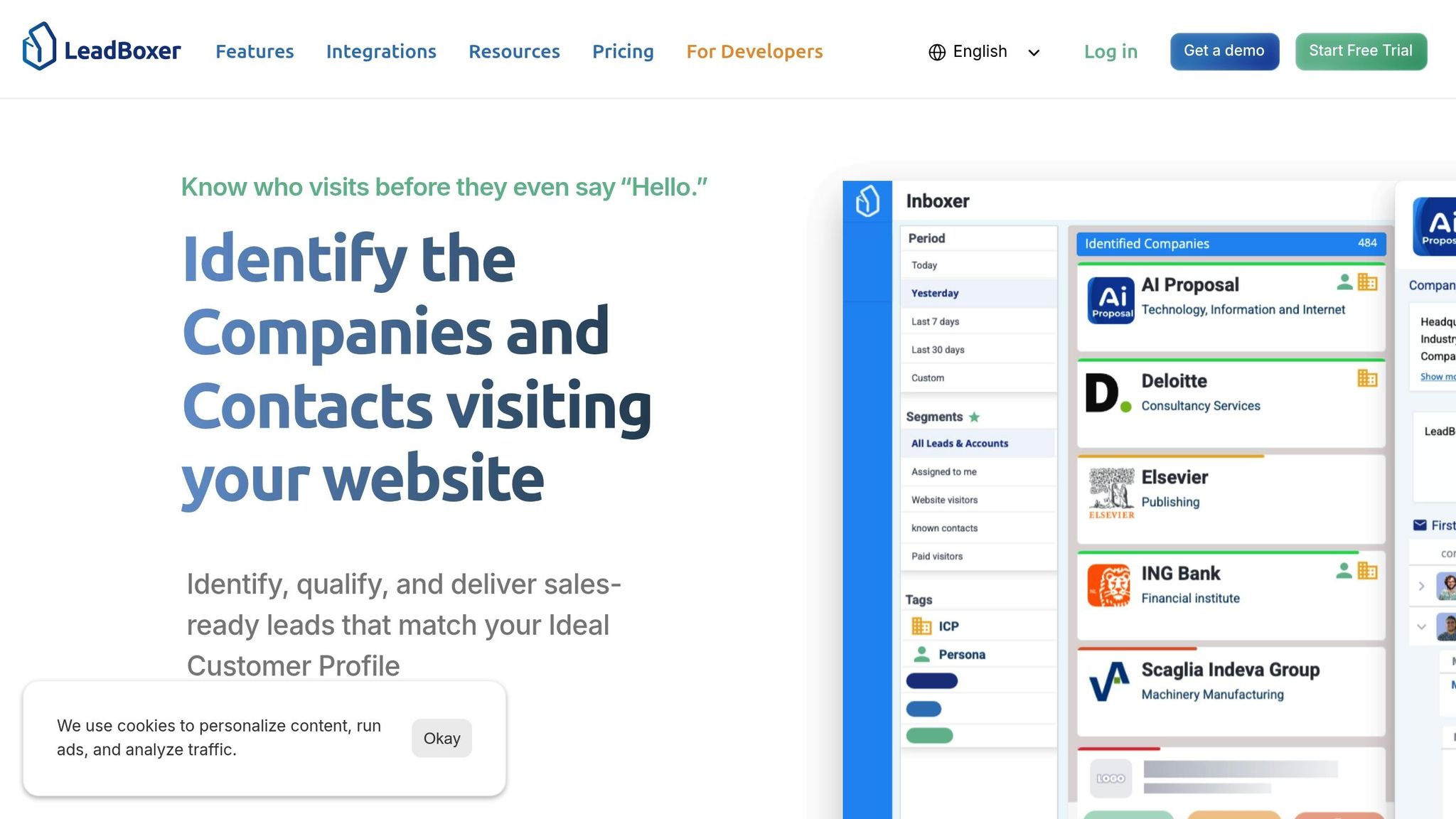
LeadBoxer brings together website activity, email engagement, and company insights, offering a unified view of every lead's journey. It captures signals from multiple touchpoints, identifies who’s behind the interactions, and scores leads based on their activity. This transforms scattered data into a clear story about each prospect's interest and intent. Let’s explore how its features provide actionable insights.
Visitor and Email Tracking
LeadBoxer keeps tabs on how prospects interact with your digital channels, offering a detailed look at their behavior. When someone visits your website, the platform tracks everything - from the pages they view and how long they stay, to specific actions like downloads, video plays, and visits to key pages like pricing or product features. Custom events, such as trial signups or webinar registrations, can also be tracked, making it easy to monitor the actions that matter most to your business.
Form submissions play a key role in identifying visitors. When someone fills out a contact form, requests a demo, or signs up for a newsletter, LeadBoxer connects this information to their browsing history. This creates a complete timeline of their interactions, showing what they explored before and after providing their details.
Email tracking extends this visibility beyond your website. Whether you’re sending personalized sales emails or large-scale newsletters, LeadBoxer monitors opens, clicks, and any website visits triggered by those email links. For example, if a prospect clicks through to your pricing page from an email, that activity is captured and added to their profile.
Custom events take tracking further by focusing on key actions specific to your business. For SaaS companies, this might include feature activations or trial usage milestones. For service providers, it could mean tracking document downloads or webinar signups. All these data points come together to give your sales team a complete picture of how prospects are engaging with your brand.
With each subsequent visit, the engagement history grows richer. Sales teams can see not just that someone visited, but exactly what they explored during each session - offering insights into which products or features resonate most.
Company and Person Identification
Once activity is tracked, LeadBoxer uses multiple methods to identify who’s behind the interactions.
IP lookup is the starting point. When visitors access your site from corporate networks, their IP addresses are matched against business registries. This reveals details like the company name, industry, size, revenue, and location - all without requiring any action from the visitor.
Email link tracking adds a personal layer. When prospects click on links in your emails, LeadBoxer ties their website activity to their email address. This direct connection allows you to track their behavior even if they haven’t filled out a form.
Form submissions provide explicit identification. When visitors submit forms, such as demo requests or contact inquiries, their information is linked to all their prior anonymous activity. This retroactive connection gives you valuable context about what they were researching before identifying themselves.
LeadBoxer also enriches profiles automatically. For companies, this includes details like employee count, revenue estimates, industry classification, and even technology usage. For individuals, it adds job titles, seniority, department information, and professional contact details. This eliminates the need for manual research, ensuring your team has the information they need for personalized outreach.
These identification methods work in harmony. A visitor might first be identified through IP lookup, then click on an email link to connect their personal identity, and finally submit a form to provide verified contact details. Together, these layers build a comprehensive profile over time.
Lead Scoring and Real-Time Alerts
Lead scoring helps prioritize prospects with the highest intent. The system evaluates actions like high-value page views, return visits, and email engagement. For example, visits to pricing pages or case studies carry more weight than general blog visits. Repeat visits signal ongoing interest and increase scores further.
Custom scoring rules let you tailor the system to your sales process. If demo requests are a strong indicator of conversion, you can assign them higher point values. Similarly, visits to specific product pages can be weighted based on their significance in driving sales. This flexibility ensures the scoring system aligns with your unique buyer journey.
Real-time alerts keep sales teams informed about important actions. Notifications can be triggered for visits from target accounts, repeat visits from leads in the pipeline, or specific page views by decision-makers. Alerts can be delivered via email, Slack, or directly into your CRM, ensuring they reach the right person at the right time.
By combining lead scoring with real-time alerts, LeadBoxer creates an efficient system for identifying and prioritizing the most promising leads. Instead of combing through visitor logs or waiting for prospects to reach out, sales teams receive timely notifications about high-intent opportunities. This allows for faster responses and ensures that prospects receive attention when their interest is at its peak.
These features work together to streamline lead management and improve the effectiveness of sales engagement efforts.
How IP Email Company Lookup Works in LeadBoxer
LeadBoxer transforms anonymous website traffic and email interactions into detailed records about companies and individuals. By processing inputs like IP addresses, email clicks, form submissions, or custom identifiers, the platform automatically builds enriched profiles.
The Lookup Process
The process kicks off when LeadBoxer receives an input. This could be an IP address from a website visitor, an email address from a form submission, a domain name, or a custom identifier from your backend system.
For website visitors, LeadBoxer's JavaScript tracker captures their IP address and matches it to business registries to identify the associated company. When it comes to email tracking, LeadBoxer embeds unique identifiers into links. These identifiers connect the recipient's email address to their website activity, even if they don’t fill out a form.
Form submissions offer explicit identification. When visitors share their details - whether to request a demo, download a resource, or subscribe to a newsletter - LeadBoxer captures this information and links it to any prior anonymous activity. This means you can see the full history of interactions, even before they submitted the form.
Additionally, server-side events can enhance profiles by incorporating CRM, billing, or product usage data, creating a more complete picture.
The system enriches these profiles in real time. Once an IP address or email is identified, LeadBoxer adds detailed company and individual data, such as company name, industry, size, location, and technology stack, as well as job titles, seniority levels, and departmental details. It also stitches together sessions from different devices or locations into a single profile, offering a unified view of engagement.
This real-time enrichment ensures that the data you receive is actionable and formatted according to U.S. business standards.
Data Outputs and U.S. Formatting
After enrichment, the data is structured for seamless use by U.S.-based teams. Company records include business names, industry sectors (classified by standard U.S. categories), employee ranges, and estimated annual revenue in U.S. dollars. Revenue figures are formatted for clarity, such as $5,000,000 or $5M.
Location details follow U.S. conventions, listing the city, state abbreviation (e.g., CA, NY, TX), and five-digit ZIP codes. For international companies with U.S. offices, the system identifies the specific location accessing your site, helping you assign leads to the right regional sales team.
Dates and timestamps use the MM/DD/YYYY format, with activity logs showing entries like "12/08/2025 2:30 PM EST" for easy tracking. Numbers are displayed with commas as thousand separators and periods for decimals. Individual records include professional contact details such as work email addresses, job titles, departments, and seniority levels, all standardized to common U.S. business terms.
Technology stack data adds another layer of insight, showing the tools and platforms a company uses. This information can be critical for tailoring your sales pitches or integration strategies. All enriched data can be pushed back to your CRM, maintaining consistent formatting across your systems.
Implementation Options for U.S. Teams
LeadBoxer offers several ways for U.S. teams to implement the platform, catering to various technical needs and use cases.
The JavaScript tracker is the quickest option. By adding a script tag (or installing via NPM for modern JavaScript frameworks), you can start capturing visitor data immediately. The tracker operates client-side, collecting page views, clicks, and custom events - making it a great choice for marketing teams looking for a fast setup without requiring heavy engineering work.
For more advanced integration, the REST API allows you to send IP addresses, email addresses, or domain names and receive enriched data in return. This is especially useful for SaaS companies that want to embed lead intelligence directly into their applications. Instead of spending months building a custom tracking and enrichment system, you can deploy LeadBoxer’s API solution in just a few days.
Email tracking involves setting up link tracking domains and enabling auto-tracking for your campaigns. Every tracked link includes parameters that monitor recipient activity, giving you control over which communications are tracked.
If you already use a CRM, LeadBoxer offers two-way sync integrations. For example, the HubSpot integration uses HubSpot tracking cookies to enrich contact records with firmographic data, saving time by automating the process.
For agencies and SaaS companies, there’s a white-label deployment option. This allows you to embed LeadBoxer into your product with custom branding. You can also use server-side event tracking to integrate backend events like CRM updates, billing data, or product usage metrics, creating a comprehensive view of each lead.
Most teams start with the JavaScript tracker for quick results and then expand to API integration and CRM synchronization as their needs grow. Pricing is usage-based, so costs scale with your actual activity. For smaller teams, the flat-rate plan starts at $195 per month, making it accessible for B2B companies of various sizes.
LeadBoxer prioritizes security and privacy, with EU hosting, GDPR-first design, tenant isolation, and API key scoping by default. It also meets ISO 27001 standards, offering the level of security that enterprise clients expect.
B2B Lead Generation and Workflow Automation with LeadBoxer
LeadBoxer transforms website traffic into actionable leads by connecting visitor activity with detailed company and contact information. For U.S. B2B teams, this means less manual research and more time focusing on qualified prospects who are already showing interest.
Identifying and Qualifying Anonymous Visitors
Many website visitors remain anonymous, but LeadBoxer uncovers hidden prospects using a multi-layered approach to reveal these anonymous browsers.
The platform's IP identification engine works by tapping into multiple data sources to perform reverse IP lookups, matching visitor IP addresses to specific companies [6]. To ensure accuracy, it filters out irrelevant IP addresses, such as those from ISPs, hosting services, telecoms, mobile networks, and VPNs. It also accounts for browser privacy settings that might obscure visitor identities [6]. This ensures your team focuses on genuine prospects.
Once a company is identified, LeadBoxer assigns a lead score based on several factors, including the visitor’s profile fit, firmographics, on-site behavior, email engagement, and social signals. This scoring system helps your team prioritize leads most likely to convert, so they know where to focus their efforts.
The platform also tracks sessions across devices, which is critical since the average B2B buyer spends about 20 hours researching before reaching out to a sales representative. Email clicks are linked to site activity, offering insights into how well your content resonates and indicating buyer intent.
Additionally, LeadBoxer automatically captures interactions like form submissions, chatbot conversations, newsletter sign-ups, and portal logins. This builds a complete view of the customer journey, making it easier to understand and engage with prospects.
Automating Lead Management Workflows
After identifying leads, LeadBoxer simplifies follow-up with automated workflow tools.
Manual lead routing and follow-up can slow down the process and risk losing deals. LeadBoxer eliminates these delays by automating workflows, ensuring prospects receive timely responses while they’re still engaged.
The platform’s Leadboard acts as a visual pipeline, showing each prospect's status and history. Instead of wasting time on manual searches, your team can quickly determine which leads are hot, which need nurturing, and which have cooled off.
Custom notifications are triggered when certain behaviors or scoring thresholds are met. For instance, if someone from a target company visits your pricing page multiple times in a week, LeadBoxer can instantly alert the assigned sales rep via email or Slack. The notification includes critical details, such as the company name, contact information, pages viewed, and engagement score, giving your team everything they need to start a meaningful conversation.
Automated lead assignment ensures prospects are routed to the right team members based on your criteria. For example, you can assign leads by region, company size, industry, or product interest. A California-based prospect might go to your West Coast team, while a New York lead could be assigned to your Northeast team.
Two-way CRM integration keeps data consistent across systems without any manual effort. When LeadBoxer enriches a contact record with firmographic data, that information is automatically updated in your CRM. Similarly, any updates in your CRM - like changes in deal stages or added notes - are reflected in LeadBoxer, eliminating duplicate work and ensuring accuracy.
Workflow automation doesn’t stop at lead capture. You can set up sequences to trigger follow-up emails, create tasks for account executives, adjust lead scores based on new activity, or flag accounts for review if engagement drops. These processes integrate seamlessly with your existing CRM and marketing tools.
Key Metrics for U.S. B2B Teams
Once your workflows are automated, tracking performance becomes essential. LeadBoxer offers real-time metrics to help U.S. teams refine their strategies and improve their automated processes.
Here are some of the key performance indicators LeadBoxer provides:
Lead conversion rates: Measure the percentage of identified visitors who become marketing-qualified leads (MQLs) or sales-qualified leads (SQLs). These rates can be segmented by traffic source, industry, company size, and more, helping you fine-tune your approach.
Pipeline value in USD: Displays potential revenue from active opportunities in U.S. currency (e.g., $487,500 or $487.5K), making it easier to report to stakeholders.
Regional segmentation: Breaks down performance by U.S. state or metro area, which is especially useful for territory-based sales teams. Insights from this data can guide localized strategies and messaging adjustments.
Engagement scoring trends: Tracks whether prospects are becoming more engaged over time or losing interest. This helps prioritize outreach and identify at-risk opportunities.
Time-to-contact metrics: Measures how quickly your team reaches out after a prospect shows high-intent behavior. Faster responses often lead to higher conversion rates. LeadBoxer timestamps all activities in MM/DD/YYYY format with time zones (e.g., 12/08/2025 3:45 PM EST), making it easy to track response times accurately.
Source attribution: Identifies which channels generate the most valuable leads, helping you optimize your marketing spend and focus on the most effective strategies.
Account-level metrics: Aggregates activity across a target company, capturing data like total page views, unique visitors, and engagement trends across departments. This is particularly useful for enterprise sales, where multiple stakeholders are involved.
All metrics update in real time, giving you immediate insights into prospect engagement and performance.
Plans, Implementation, and Best Practices
After diving into LeadBoxer's features, U.S. teams are ready to choose a plan, set up the platform, and follow proven strategies to boost lead conversion.
LeadBoxer Plans Overview
LeadBoxer offers pricing options tailored to teams at various stages, whether you're a startup exploring visitor tracking or a larger organization managing intricate lead processes.
Free Tier: Includes essentials like basic visitor tracking, IP-to-company matching, and API access.
Paid Plans: Starting at $205/month, these plans unlock advanced automation, higher data limits, and enriched insights.
Enterprise Plan: Designed for larger organizations, this plan provides custom solutions, premium support, and enterprise-level integrations.
Reseller Plan: Ideal for agencies interested in white-labeling LeadBoxer's tools.
When selecting a plan, consider factors like your monthly visitor count, team size, and the need for API integrations. For example, if you're tracking 5,000 visitors now but expect that to double in six months, opt for a plan that accommodates future growth to avoid mid-quarter disruptions.
Once you've chosen a plan, the next step is to install and configure the platform.
Implementation Steps for U.S. Teams
Getting started with LeadBoxer involves three key steps: installing the tracking code, integrating existing tools, and setting up scoring rules.
Website Tracking Installation
Add LeadBoxer's JavaScript snippet to your website, which is often managed through Google Tag Manager, to ensure it loads on every page. If your business operates multiple domains (e.g., a marketing site, product documentation, or customer portal), apply the code to all of them to capture the complete customer journey.
CRM and Email Tool Integration
Connect LeadBoxer to your CRM and email platforms for seamless data flow without manual intervention. Popular integrations include Salesforce, HubSpot, and Pipedrive. Carefully map custom fields during setup - for instance, syncing a "decision timeline" field ensures engagement scores reflect purchase urgency. You can also link email tracking to website activity, revealing how prospects interact with your content across channels. Set up custom notifications via Slack or email to alert your team when significant actions occur, such as a prospect viewing the pricing page or a high engagement score being triggered.
Defining Scoring Rules and Filters
Create scoring rules that prioritize specific customer profiles, like mid-market U.S. SaaS companies with 50–500 employees. Assign higher scores to key actions, such as viewing the pricing page or making repeat visits. Use geographic filters to route leads based on time zones (Eastern, Central, Mountain, or Pacific) to ensure timely follow-ups during local business hours.
Test your scoring model over a 30-day period. Compare lead scores against actual conversion rates. If low-scoring leads are converting at similar rates to high-scoring ones, adjust your rules until the top 20% of leads consistently represent your best opportunities.
Best Practices for Success
After implementation, these practices will help maintain accuracy and maximize results.
Data Accuracy
Regularly update filters to keep data accurate. IP databases can change due to company relocations, mergers, or the rise of remote work, which can complicate traditional IP tracking. While LeadBoxer automatically filters many irrelevant IPs, you should periodically review and refine exclusion filters. To fill in gaps, combine IP tracking with form submissions and email tracking.
Team Training and Collaboration
Train your sales team to interpret engagement scores effectively. For instance, a high score from a target account may call for immediate outreach, while a lower score might indicate a need for nurturing. Encourage them to use the Leadboard to filter leads by score, region, or activity. Additionally, review source attribution data to identify which campaigns - such as LinkedIn ads - generate higher-quality leads. Regular alignment meetings between sales and marketing teams ensure everyone is on the same page about what defines a qualified lead.
Performance Monitoring
Keep an eye on U.S.-specific metrics like conversion rates, pipeline values, and response times for high-intent leads. Compare how many identified companies turn into opportunities versus those from form submissions. If needed, tweak your scoring parameters. For teams using territory-based lead assignments, periodically check routing rules to ensure leads are being assigned correctly.
Document your setup, including scoring weights, filters, notifications, and CRM mappings, in a shared resource to ensure consistency and clarity across your team.
Conclusion
LeadBoxer combines website visitor tracking, IP-to-company matching, and email engagement into one streamlined platform tailored for U.S. B2B teams looking to act quickly on qualified leads. It provides a consolidated view of visiting companies, the pages they’ve explored, and their engagement levels.
By automating tasks like data capture, IP matching, profile enrichment, and lead scoring, LeadBoxer eliminates the need for time-consuming manual research. This allows managers to focus their energy on prospects that are already showing interest. Plus, SaaS developers can easily integrate these features using the platform's API.
What sets LeadBoxer apart for U.S. teams is its seamless integration with the tools you’re already using, such as CRMs and email platforms. Whether your business tracks 500 visitors a month or 50,000, the platform scales effortlessly to meet your needs while maintaining the precision necessary for accurate lead qualification. This all-in-one solution transforms anonymous website traffic into actionable leads, fitting neatly into your existing workflow.
To get the most out of LeadBoxer, it’s essential to focus on three key areas: selecting the right plan based on your visitor volume, setting up lead scoring rules aligned with your ideal customer profile, and consistently refining your filters as your business grows. With thoughtful implementation and regular adjustments, you can boost conversion rates and improve the quality of your sales pipeline. LeadBoxer gives you the data you need to act - quickly and effectively.
FAQs
How does LeadBoxer comply with privacy regulations like GDPR and CCPA when tracking website visitors?
LeadBoxer places a strong emphasis on privacy compliance by securing explicit consent before processing any data that could identify individuals. This ensures that user privacy is respected from the outset.
The platform also takes care to prevent collected data from being merged with personal or other information that might result in creating detailed user profiles. On top of that, LeadBoxer adheres to rigorous data protection practices to meet privacy regulations, maintaining transparency and protecting user information throughout the process.
What information does LeadBoxer provide about website visitors, and how is this data enhanced for better lead insights?
LeadBoxer gathers information about the companies and individuals visiting your website through methods like IP address lookups, form submissions, email link tracking, and custom events. The collected data is then enriched with firmographic details - such as industry, company size, location, and website - as well as behavioral insights like page views, clicks, and email interactions.
This blend of identification and enrichment allows LeadBoxer to create detailed lead profiles, helping you better understand and prioritize your potential customers.
How can U.S. B2B teams use LeadBoxer to streamline lead management with their CRM and email tools?
LeadBoxer works effortlessly with widely-used CRM and email platforms, making it easier for U.S. B2B teams to streamline their lead management processes. By linking website activity, email interactions, and other behavioral data, it delivers enriched insights right into the tools you already use.
This setup helps teams pinpoint and qualify leads faster, keeping all essential data organized in one place. Plus, with automated syncing, you can refine your lead generation efforts without interrupting your existing workflow.
Related Blog Posts
Build on the LeadBoxer Platform
APIs for tracking, company identification, enrichment and scoring. The first 25,000 credits are free.