LeadBoxer Platform As A White-Label Tracking And Identification Engine For SaaS Vendors
White-label lead tracking for SaaS: map tenants to datasets, keep API keys backend-side, and use LeadBoxer for ID, enrichment, and scoring.

You can add LeadBoxer-powered lead tracking to your SaaS product without building the backend engine. I’d start with one account activity queue, map each customer to a separate dataset, and keep API keys on your backend.
The split is simple: you own the branded dashboard and customer workflows. LeadBoxer handles tracking, identification, enrichment, and scoring. But <u>a company match is not a person’s identity</u> - person-level records need signals such as a form submission or login.
Here’s what I’d plan before launch:
Data flow: Connect browser and server events, then check processing delays and dashboard update timing.
Lead features: Show activity timelines, company details, scores, segments, and alerts - with the signals behind each result.
Privacy and access: Keep customer data separate, follow consent rules, and carry deletions through caches and exports.
Costs and testing: Company enrichment uses 10 credits per API call. Confirm plan limits and white-label terms, then test retries, duplicate events, and customer access.
My starting point: make one feature reliable, measure its results and credit use, then add more.
LeadBoxer Integration Requirements
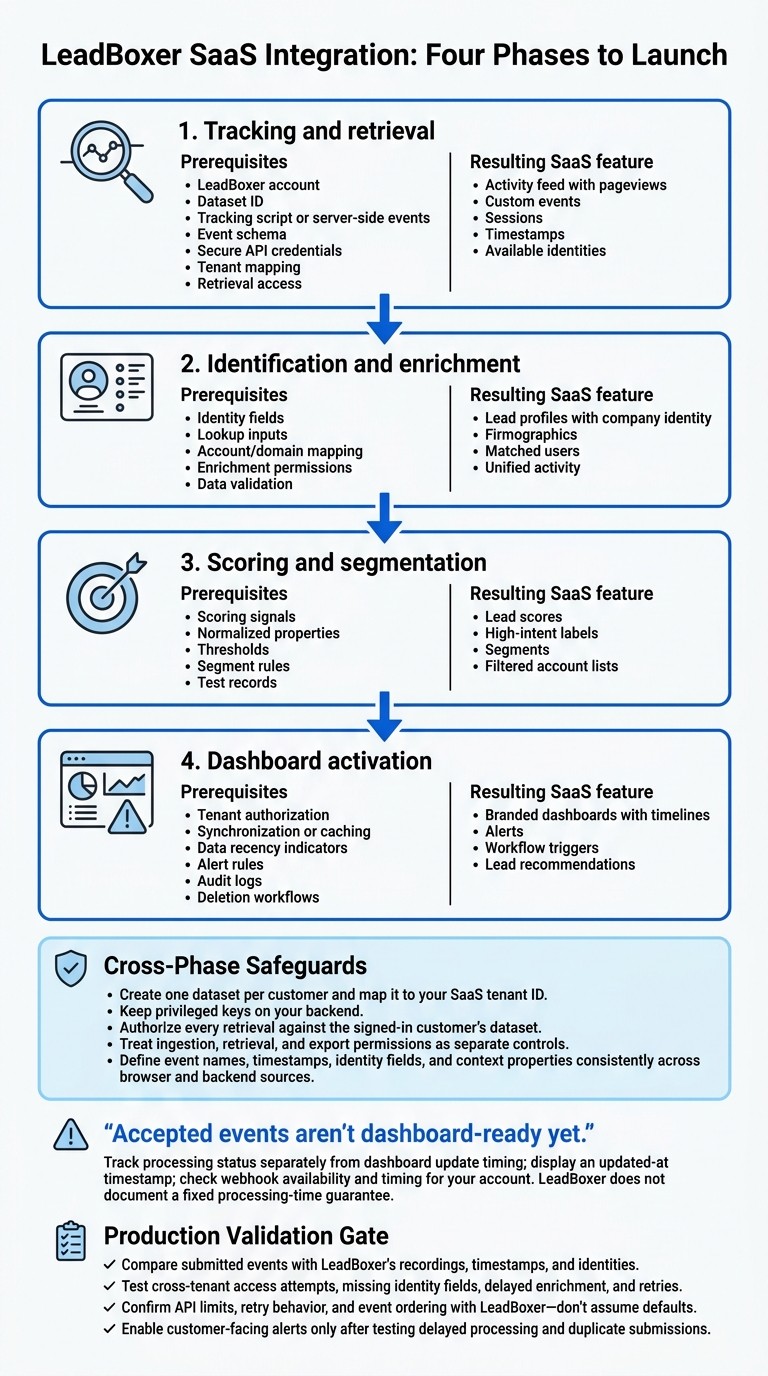
LeadBoxer SaaS Integration: Four Phases to Launch
From Events to Dashboard Data
LeadBoxer receives browser activity, email events, form submissions, custom events, and server-side submissions. Session and identity fields connect that activity to records for identification, enrichment, and scoring. Before implementation, define event names, timestamps, identity fields, and context properties so browser and backend sources record the same action consistently.
Accepted events aren't dashboard-ready yet. Track processing status separately from dashboard update timing, and display an updated-at timestamp. Check webhook availability and timing for your account. LeadBoxer does not document a fixed processing-time guarantee.
With event flow defined, tenant mapping and secure access control which records each customer can see.
Tracking, API Credentials, and Tenant Setup
Create one dataset per customer and map it to your SaaS tenant ID. Install the tracking script, then configure backend collection for activity that shouldn't depend on a browser.
Current docs list api.leadboxer.com/v1/leads for retrieval, x-api-key for authentication, and GET or POST for Track API submission. Before coding, verify each endpoint's authentication, permissions, and request schema. Keep privileged keys on your backend, and authorize every retrieval against the signed-in customer's dataset.
Treat ingestion, retrieval, and export permissions as separate controls.
Once access and tenant mapping are in place, decide which fields customers will visualise in the branded dashboard.
A Phased Integration Plan
These phases take the integration from raw tracking data to customer-facing lead features.
Phase | Prerequisites | Resulting SaaS feature |
|---|---|---|
Tracking and retrieval | LeadBoxer account, dataset ID, tracking script or server-side events, event schema, secure API credentials, tenant mapping, retrieval access | Activity feed with pageviews, custom events, sessions, timestamps, and available identities |
Identification and enrichment | Identity fields, lookup inputs, account/domain mapping, enrichment permissions, data validation | Lead profiles with company identity, firmographics, matched users, and unified activity |
Scoring signals, normalized properties, thresholds, segment rules, test records | Lead scores, high-intent labels, segments, and filtered account lists | |
Dashboard activation | Tenant authorization, synchronization or caching, data recency indicators, alert rules, audit logs, deletion workflows | Branded dashboards with timelines, alerts, workflow triggers, and lead recommendations |
Before production, compare submitted events with LeadBoxer's recordings, timestamps, and identities. Test cross-tenant access attempts, missing identity fields, delayed enrichment, and retries. Confirm API limits, retry behavior, and event ordering with LeadBoxer - don't assume defaults. Enable customer-facing alerts only after testing delayed processing and duplicate submissions.
Available Tracking and Identification Data
Once integration is in place, decide which data points to include in customer-facing dashboards.
Events, Sessions, and Identity Data
Keep behavior, company records, contact fields, and authenticated activity in separate data layers. These inputs support branded lead features. Display contact fields only when an authorized source supplies them.
Data type | Typical source | Dashboard use |
|---|---|---|
Pageviews | Tracking script or pixel | Visited pages and visit frequency |
Clicks | Automatic browser interactions or custom events | Button, download, and content engagement |
Form submissions | Enabled form detection or configured tracking | Submitted fields and contact fields |
Email interactions | Email tracking pixels, tracked links, or integrations | Recorded opens and clicks |
Custom events | JavaScript or server-side submissions | Trial starts, feature use, and account milestones |
Session history | Session IDs and first-party browser identifiers | Event sequences and returning-browser activity |
Referral context | Referrer, landing page, and campaign parameters | Traffic source and campaign context |
Company records | IP matching, domain lookup, or authorized account data | Company name and firmographics |
Contact records | Forms, authenticated identifiers, or authorized integrations | Name, email, role, and identity source |
Use this mapping to build profile cards and timelines while keeping browser activity separate from person-level identity.
Enrichment, Lead Scores, and Segments
Display enriched company and contact fields separately from observed events. Include the source, recent activity, and match confidence when available. Flag ambiguous IP matches and missing contact identity rather than filling gaps with assumptions.
Score leads using property and behavior rules, such as range, match, existence, and event boosts. These fields support ranking and filtering in customer-facing dashboards. Combine company fit with engagement and lifecycle status, then filter segments by score, industry, source category, or customer status.
A score sets review priority - it doesn’t prove purchase intent. Keep the contributing signals visible so customers can see why a record ranks highly.
Privacy and Data Quality
After scoring and segmentation, apply data rules that help customers trust what the dashboard shows.
Collect only the fields the feature needs. Follow applicable consent and opt-out requirements, and exclude internal, test, or other unwanted traffic from lead scoring.
Label customers separately from prospects and enforce tenant-level viewing permissions. Carry corrections and deletion requests through to cached records and exports. Retention varies by subscription type.
Flag shared IPs, VPN traffic, outdated records, and missing tracking instead of treating gaps as inactivity. Store timestamps consistently, then display them in the customer’s selected time zone with the time zone label shown.
Building Branded Lead Features
Lead Profiles, Activity Timelines, and Alerts
Use LeadBoxer’s API to pull collected, enriched, and qualified data into profiles and activity timelines inside your product. Customers won’t need to switch to a separate application. Put the trigger, company, contacts, and score explanation in one view. Alerts and queues should show which events qualified, which filters matched, and what to do next.
For example, a B2B SaaS integration could flag a company after three pricing-page visits within 14 days if it also matches the customer’s target industry and employee range. Show those events and fit criteria alongside an
assign to salesaction. If multiple visitors are associated with the same company, describe it as account engagement from multiple observed visitors rather than proof of a coordinated buying group or purchase decision.
Lead Workflows and Usage Costs
Once the branded dashboard is visible, map how each qualifying event reaches the next system using workflow automation. Validate the event, apply qualification and suppression rules, and update the dashboard signal. Then send qualified records to a CRM, automation tool, or internal queue. Run enrichment asynchronously where possible, deduplicate alerts, and let customers set thresholds and destinations.
With routing in place, usage costs set the limits. Estimate usage based on events and API calls. LeadBoxer charges a fixed number of credits per request for credit-based API endpoints. Company enrichment costs 10 credits per API call. Cache results to avoid repeated domain lookups.
Published pricing includes 25,000 free credits per month, with 100,000, 250,000, and 1,000,000 credits in the Starter, Growth, and Scale tiers, respectively. Treat these allowances as planning figures until you confirm white-label terms, API access, support, and overage rules.
Plan | Published monthly credits | Best-fit use case |
|---|---|---|
Free/pay-as-you-go | 25,000 | Testing, prototyping, or low-volume usage |
Starter | 100,000 | Early-stage products and smaller teams |
Growth | 250,000 | Scaling SaaS platforms |
Scale | 1,000,000 | High-volume or enterprise deployments |
Conclusion: Start with One Lead Feature
Launch one customer-facing lead feature, such as an account activity queue, and get its workflow working reliably before adding more. Your product owns the branded experience; LeadBoxer supplies the underlying engine.
Track match rate, duplicate rate, event latency, alert precision, and credits per qualified account. Once that first feature is reliable, add enrichment, scoring, and automated routing.
FAQs
How can I link anonymous visits to users after login?
Call the LeadBoxer identify method after a user logs in. Pass their details, such as their email address and user ID:
This links their earlier anonymous session history to their known profile, giving you one activity timeline to display in your product dashboards.
How should I handle uncertain company matches?
Use identity stitching to connect anonymous sessions to known accounts through stable identifiers, such as email addresses or internal user IDs. Before matching, normalize domains by removing prefixes like www and http, along with trailing slashes. This helps prevent duplicate records.
If gaps remain, check event logs in the LeadBoxer app for missing properties or stitching issues. Share details about your integration setup to get tailored recommendations.
How can I forecast credit costs per customer?
Use a separate dataset for each customer to monitor event volume and enrichment activity. This lets you measure credit consumption per account.
LeadBoxer assigns a specific credit cost to each API call for tracking, company identification, or enrichment. You can track this usage through the platform.
Apply your volume-based pricing model to these usage figures to forecast and manage each customer’s costs.
Related Blog Posts
LeadBoxer Platform for Website Visitor Identification and IP-to-Company Matching
Comparing White-Label Tracking And Identification Engines For SaaS Vendors
LeadBoxer Platform: API-First Company Identification For Website And Product Traffic
Replacing Homegrown Tracking Pipelines With The LeadBoxer Platform
Build on the LeadBoxer Platform
APIs for tracking, company identification, enrichment and scoring. The first 25,000 credits are free.