
How to Stream Enriched Lead Data into Your Product in Real Time
Stream enriched lead data into your product using tracking scripts, enrichment APIs, webhooks, CRM sync, and scaling best practices.

When a visitor fills out a form on your website, you often get just a name and email. But what if you could instantly transform that basic info into a detailed profile with company size, job title, industry, and even behavioral insights? That’s what enriched lead data does - and streaming it in real time enables faster responses, smarter workflows, and better personalization.
Here’s why it matters:
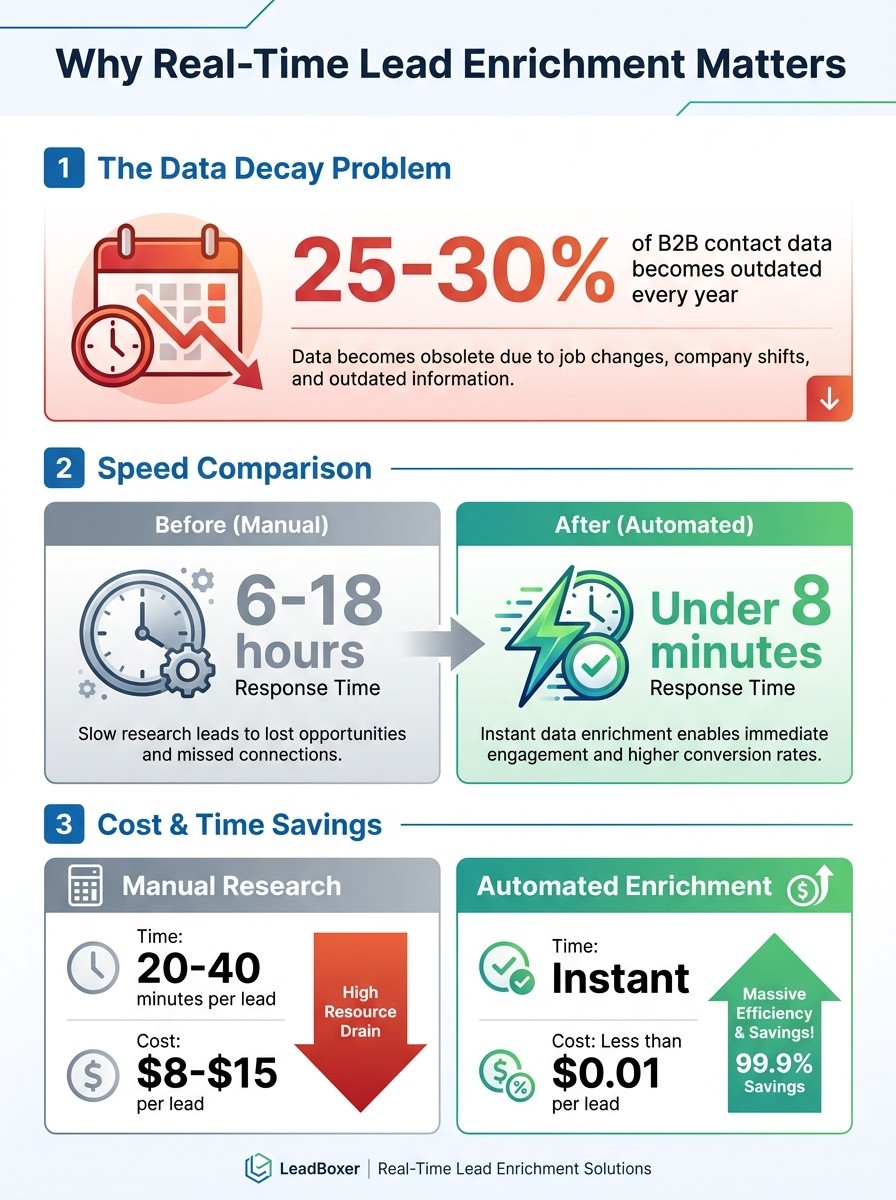
Outdated data is a problem: 25–30% of B2B contact data becomes outdated every year.
Speed is key: Automating enrichment can cut response times from 6–18 hours to under 8 minutes.
Save time and money: Sales teams spend 20–40 minutes manually researching leads. Automated enrichment costs less than $0.01 per lead compared to $8–$15 manually.
How to get started:
Install a tracking script (e.g., LeadBoxer) to monitor visitor behavior.
Use APIs to enrich data with firmographics, technographics, and intent signals.
Build a pipeline to deliver enriched data into your CRM or product workflows.
Real-Time Lead Enrichment ROI: Cost Savings and Speed Improvements
You Won't Believe How Easy It Is To Automate Lead Enrichment With Freckle
Setting Up LeadBoxer for Real-Time Lead Data
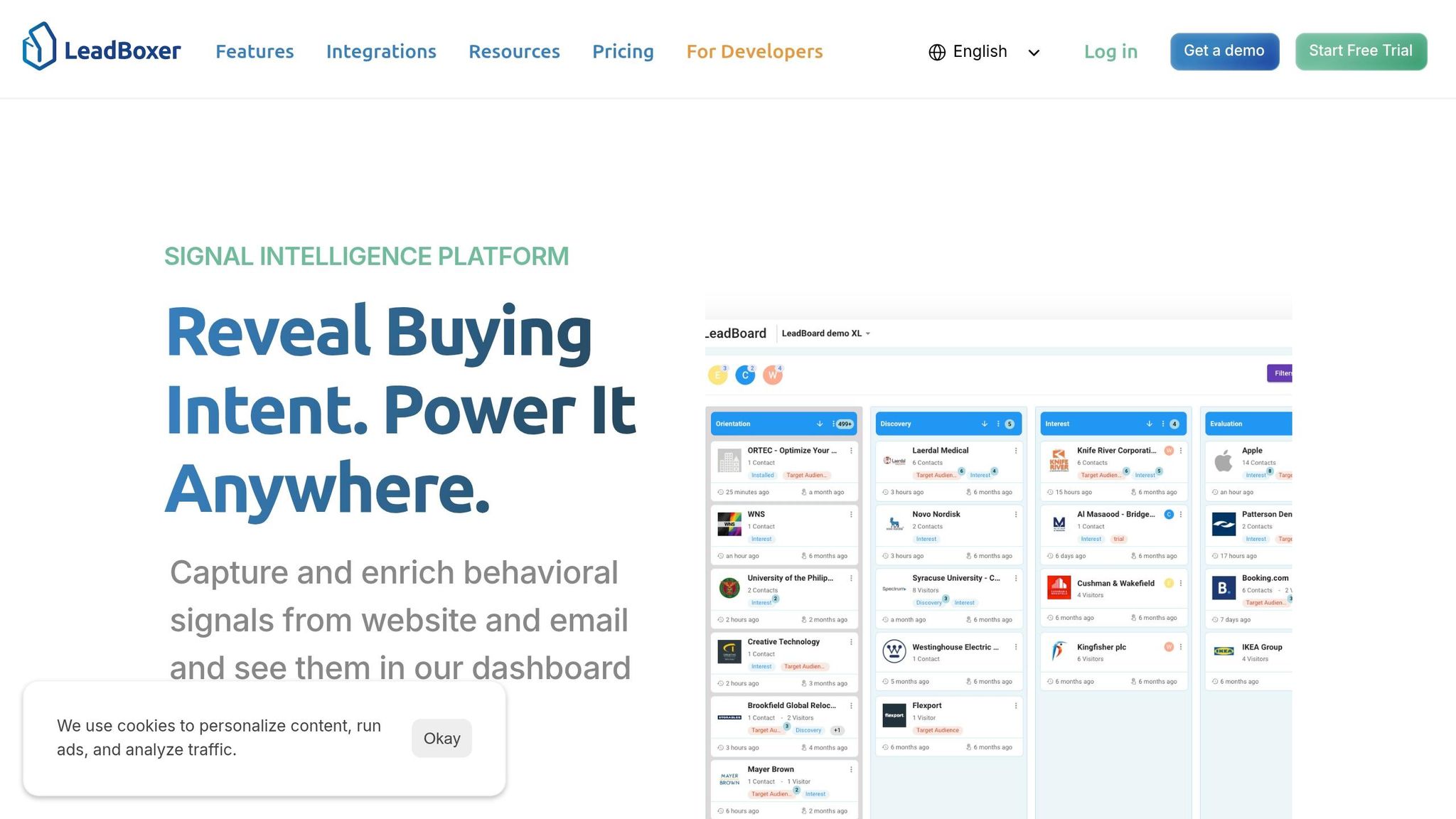
Getting LeadBoxer up and running to integrate enriched lead data into your product is quick and straightforward. The setup process takes just 10 minutes. LeadBoxer uses a lightweight JavaScript tracking script and API access to track visitor behavior, identify companies, and enrich lead data automatically. Once configured, you’ll start seeing enriched profiles and identified companies flow into your system almost immediately.
Installing the LeadBoxer Tracking Script
To get started, log in to your LeadBoxer dashboard and go to Account Settings. Here, you’ll find your unique JavaScript snippet, which includes your dataset identifier. This snippet ensures all tracked activity links back to your account. Copy the code and paste it into your website’s <head> section, just before the closing </head> tag.
Here’s how to implement it based on your setup:
WordPress websites: Use a plugin like Header and Footer Scripts to add the code without altering theme files.
Custom-built sites: Work with your development team to embed the script directly in your site’s template.
Google Tag Manager: Create a Custom HTML tag with the LeadBoxer script and set it to fire on all pages.
Once installed, check the Live View in your LeadBoxer dashboard to confirm the setup. Visitor activity should start appearing within 5-10 minutes. LeadBoxer can identify 40-60% of anonymous B2B website traffic as named companies, using a global IP database that covers 99% of internet traffic.
Be aware that ad blockers can reduce identification rates by 10-20%. If this becomes an issue, you can enable LeadBoxer’s server-side tracking option to bypass browser-level blockers. After setting up the tracking script, you can move on to integrating APIs for advanced data enrichment.
Using LeadBoxer APIs for Data Enrichment
LeadBoxer provides three API groups tailored to different needs:
Track API: Logs server-side events like user registrations or subscription upgrades that occur outside the browser.
Lookup APIs: Converts IP addresses into company data or enriches existing domains with detailed firmographics.
App API: Fetches leads, manages segments, and exports data for BI dashboards.
Each API request requires your dataset ID (si) and an event name (ti). For better accuracy, include identifiers such as userId or email. To update an existing lead from your backend, retrieve the LeadBoxer User ID from the browser using the JavaScript function ot_uid(), then include it as the uid parameter in your server-side request.
The enrichment APIs work independently of the website tracking pixel. For instance, you can send an IP address and receive enriched details like company name, industry, revenue range, employee count, and a confidence score. Domain lookups provide additional insights, such as technology stack data, location, and ICP (Ideal Customer Profile) fit indicators - perfect for scoring leads in your CRM or product interface.
Properties attached to events (e.g., plan=premium or industry=fintech) are automatically added to the user profile, enabling ongoing enrichment with each interaction. This progressive approach removes the need for manual data entry, making lead profiles more detailed over time. With reliable API-based enrichment in place, you can manage your credit usage to scale effectively.
Configuring Credit-Based Usage for Scaling
LeadBoxer uses a credit-based consumption model, where each action consumes credits. For example:
Basic company identification costs 1 credit per visitor.
Enhanced enrichment, including contact details and firmographics, costs 2-5 credits depending on the depth of data.
You can monitor your credit usage in the Billing dashboard and set alerts at the 80% threshold to avoid unexpected overages. For SaaS platforms serving multiple clients, create unique datasets for each customer to ensure data isolation and precise usage tracking per account. Use sandbox mode for testing configurations to conserve credits.
To make the most of your credits, focus on enriching high-priority leads that align with your ideal customer profile. You can also:
Batch API requests during off-peak hours.
Set enrichment rules to trigger only for visitors meeting specific criteria (e.g., companies with over 50 employees or specific industries).
This targeted approach can reduce credit consumption by 30-50% without compromising data quality.
Building a Real-Time Data Streaming Pipeline
Once LeadBoxer enriches your data, the next step is setting up a reliable pipeline to deliver that information directly into your product's infrastructure. A well-structured pipeline ensures that enriched lead data flows seamlessly into your database, CRM, or application interface. This allows you to trigger automations, update dashboards, or streamline sales workflows without interruptions.
Connecting LeadBoxer to Your Data Infrastructure
After configuring LeadBoxer, it's time to design a pipeline that transfers enriched data effortlessly to your systems. LeadBoxer offers several integration options to fit your technical setup. For instance, REST APIs are perfect for fetching data on demand, making them ideal for batch processing or scheduled synchronizations. If you need real-time updates, webhooks (Watchers) are the way to go. These push data as soon as changes occur, eliminating delays caused by polling.
For teams working in low-code environments or connecting LeadBoxer to third-party tools, platforms like Zapier, Make, and n8n provide pre-built connectors for quick and easy integration. For more custom solutions, LeadBoxer’s Track API can log server-side events, while the Lookup APIs add firmographic details to domains or IP addresses. Additionally, the App API allows you to export qualified leads or manage segments programmatically.
When setting up webhooks, choose the trigger mode that matches your workflow. For example, "First Match" triggers once per unique visitor, making it ideal for lead capture workflows. On the other hand, "Every Update" triggers with each new page view, which is great for tracking detailed behavior but can generate a higher volume of events. Always route webhook requests through a backend server to keep your API keys secure - never expose these calls from the frontend. Once your pipeline is connected, focus on ensuring data accuracy and consistency.
Maintaining Data Accuracy and Consistency
Speed is a key benefit of real-time pipelines, but it’s meaningless if your data is inaccurate or riddled with duplicates. To maintain quality, start by normalizing data fields as soon as you receive them. For instance, standardize country names ("US" to "United States") or job titles ("VP Sales" vs. "Vice President of Sales") to keep your database structured and searchable.
Before enriching data, implement a multi-step validation process. This could include checking email deliverability, filtering out disposable domains, and using regex to verify proper formatting. For company lookups, extract the domain from email addresses first, as domain-based enrichment tends to be more reliable than person-level lookups. To avoid redundancy, run deduplication checks against your database. If a lead already exists, update the timestamp and increment the submission count instead of creating duplicate records.
Map the enriched data to the correct fields in your CRM or database. For example, employee counts should populate numerical fields, not text fields, to ensure accurate filtering and reporting. Regularly review these mappings to confirm records are updating correctly and duplicates are merging as expected. For cases where enrichment returns incomplete or no data, route those records to a manual review queue rather than discarding them outright. With consistent and accurate data in place, you can shift your attention to managing high-volume streams.
Managing High-Volume Data Streams
As your traffic grows, your pipeline must handle thousands of events per hour without breaking down. Implement a two-tier caching system to reduce redundant API calls. Use a short-term cache, like Redis, to manage duplicates within a 24–48 hour window, and long-term storage (such as Postgres) with a "last_enriched_at" timestamp to avoid re-enriching the same lead for 30–90 days.
When working with large datasets - like importing 10,000 leads from a CSV file - process leads in batches of 50–100, adding small delays between batches to avoid hitting API rate limits. If you encounter HTTP 429 errors, apply exponential backoff to give the API quota time to reset.
Monitor your pipeline’s health by keeping an eye on enrichment success rates, processing times, and API errors. For large datasets, use pagination (around 50 records per page) with the App API to manage the load efficiently. These strategies will help your pipeline handle increasing lead volumes without slowing down or failing.
Adding Enriched Lead Data to Your Product Workflow
Once your pipeline is reliably delivering enriched data, the next step is figuring out how to use that information effectively. It's time to go beyond just gathering data and start leveraging it to automate workflows, create personalized experiences, and bring sales and marketing teams together around high-value leads.
Connecting to CRM Tools for Workflow Automation
Integrating enriched lead data into your CRM can transform the way you manage leads. For instance, you can set up your CRM to automatically update lead scores, pipeline stages, and custom fields as soon as a new contact is added. Imagine LeadBoxer identifies a visitor from a company with over 500 employees - this data should populate a numerical field in your CRM, not a text one, ensuring accurate filtering and reporting.
To keep your data clean and consistent, use AI tools to standardize inputs before they enter your CRM. For example, you could use ChatGPT via Zapier to normalize job titles like "VP Sales" and "Vice President of Sales" into a single, searchable format. LeadBoxer’s identity stitching feature can also merge anonymous web traffic with existing CRM records, giving you a complete view of each lead’s journey. When integrated seamlessly, your CRM becomes a powerhouse for driving product improvements.
Building Product Features with LeadBoxer Data
Enriched lead data can fuel product features that deliver tailored user experiences and highlight high-intent accounts. If you’re embedding LeadBoxer into a SaaS product, it’s crucial to keep customer datasets separate to ensure data security and proper usage. This setup prevents any mix-up between accounts while maintaining data integrity.
You can choose between synchronous enrichment for instant personalization during onboarding or asynchronous enrichment for high-traffic applications where immediate feedback isn’t critical. Personalized onboarding using enriched data can increase user activation rates by 20–30%. For example, if a user signs up with a company email from a Fortune 500 enterprise, you can immediately guide them into an enterprise-specific onboarding flow instead of a generic one.
Real-time triggers are another powerful feature. Set up alerts for "hot leads" that meet specific criteria, such as a high score combined with signals like a "hiring surge" or "recent funding". Pre-calculating flags like is_enterprise or is_recently_funded during the enrichment process simplifies logic for routing and filtering later. This allows your product to surface valuable leads instantly without running complex queries every time, streamlining sales and marketing efforts.
Automating Sales and Marketing with Real-Time Data
With automated CRM workflows and personalized product features in place, real-time data can help align sales and marketing strategies. Use scoring models to prioritize leads based on their behavior and firmographic details. For example, you might assign points as follows: +20 for visiting a pricing page, +30 for having a C-level title, +50 for engaging with a solution page, +40 for requesting a demo, and -50 for email bounces. Once a lead hits a threshold - such as 100 points - you can automatically assign them to a sales rep or trigger a personalized email sequence.
Automation can also save time on creating custom sales materials. For instance, when a new deal is added to your CRM, you could trigger the generation of a Google Slides deck tailored to the lead. If LeadBoxer identifies a healthcare company with over 1,000 employees, your system could automatically produce a deck featuring case studies from similar organizations. This eliminates hours of manual work while ensuring prospects receive relevant, timely content.
Combining behavioral event streams with firmographic enrichment creates unified lead or account profiles. You can track visitor behavior - like the pages they view, the time spent on your site, and the resources they download - while layering on details such as company size, industry, and funding status. This comprehensive profile helps marketers design campaigns that resonate with specific segments, while sales teams can focus their efforts on leads that show both strong intent and a good fit.
Optimizing and Scaling Real-Time Lead Data Streaming
Once your data pipeline is up and running, the next step is to ensure it stays efficient and is prepared for growth. As your lead volume increases, it’s important to monitor performance, manage costs wisely, and build a system capable of handling enterprise-level demands.
Monitoring and Troubleshooting Your Data Pipeline
Keeping your pipeline healthy begins with tracking API response codes. For example, an HTTP 200 signals success, while a 400 indicates invalid data formatting, 403 suggests an expired API key, and 429 means you've hit rate limits. To stay ahead of issues, set up real-time alerts through tools like Slack or Microsoft Teams to notify your team immediately when something goes wrong.
Another key metric to watch is your match rate. For a strong B2B enrichment pipeline, the match rate should stay between 70% and 85%. If it dips below 60%, it’s time to audit your lead sources. Problems like personal email addresses or typos in domains can drag down data quality. A weekly report tracking enrichment status can help you spot and address these issues early.
Dead-letter queues are another essential tool. They capture messages lost due to schema errors or system failures, helping you debug and avoid permanent data loss. To further safeguard your workflows, consider implementing three fallback paths:
Route partially enriched leads to a manual supplement queue.
Send cases with zero enrichment (e.g., personal emails) to dedicated research lists.
Handle API failures with automated retries using exponential backoff.
Here’s a quick reference table for key metrics and actions:
Metric | Target Threshold | Required Action |
|---|---|---|
Average Latency | < 200 ms | Optimize database indexing or add caching |
4xx Error Rate | < 1.0% | Check data formatting and schema consistency |
5xx Error Rate | < 0.1% | Investigate server health and API provider issues |
Match Rate | 70% - 85% | Audit lead sources for quality problems |
Once monitoring is in place, focus on using your API credits more efficiently.
Managing LeadBoxer Credits Efficiently
To control costs, focus on selective enrichment. Instead of retrieving all available data, identify the specific fields your sales team needs - like company size, industry, or tech stack. This approach not only reduces expenses but also improves response times.
Caching is another smart strategy. Add "Last Enriched At" timestamps to your database and only re-enrich records that are older than 90 days. Most company information doesn’t change frequently, so this method avoids redundant API calls. Always proxy API calls through your backend server rather than the frontend to protect your API keys and prevent unauthorized credit usage.
For high-volume tasks like CRM syncing or processing large CSV files, use batch processing. Save real-time enrichment for user-facing applications where speed is essential. This way, you can avoid hitting rate limits during periods of heavy usage.
With these cost-saving measures in place, you can shift your focus to scaling your pipeline for enterprise needs.
Scaling for Enterprise-Level Workflows
As your pipeline scales, data validation and deduplication become even more critical. Start by adding a validation layer to clean your data before enrichment. This includes verifying emails, eliminating duplicates, and standardizing formats to maintain accuracy.
Confidence scoring is another useful tool. Only write data with a confidence score above 85% and flag lower scores for review. To further optimize, adopt tiered enrichment. For high-intent actions, apply full enrichment, while for lower-priority signals, use lighter enrichment.
Here’s a breakdown of strategies to scale efficiently:
Strategy | Technical Implementation | Business Impact |
|---|---|---|
Caching | Redis / Memcached | Cuts redundant API calls, reducing costs by 20–30% |
Payload Optimization | Gzip / Brotli Compression | Improves data transfer performance by 60% |
Asynchronous Processing | Boosts system throughput by 50% | |
Transaction Consolidation | Single-transaction database operations | Reduces billable API call counts |
Conclusion
Streaming enriched lead data in real time isn’t just about improving processes - it’s about redefining how your product creates value. By adopting these strategies, you can save your sales team 20 to 40 minutes of manual lead research per prospect. Instead, automated enrichment - costing less than a cent per lead - replaces the traditional $8 to $15 SDR research cost per lead.
The results speak for themselves. Teams leveraging automated enrichment and routing can achieve first-touch times averaging under 8 minutes, compared to the 6–18 hours typical without automation. Pair this real-time data with personalized outreach based on factors like tech stack, funding, or hiring trends, and you could see reply rates jump by 3x to 4x.
LeadBoxer’s API-first design makes integration seamless, without the need for complicated infrastructure changes. Whether you’re using the Lookup API during sign-up flows, automating CRM updates, or embedding lead intelligence directly into your SaaS product, you’ll benefit from lightning-fast response times and up-to-date data. This allows your sales team to focus on high-intent accounts based on real-time behavior instead of assumptions.
Start small by incorporating LeadBoxer into one workflow - like sign-up processes or CRM syncing - and grow from there. Keep an eye on match rates, optimize your credit usage, and scale as your lead volume increases. The systems you put in place today can turn anonymous visitors into a qualified pipeline tomorrow - all without increasing your team’s workload.
FAQs
What data fields should I enrich first?
To make the most of your lead data, focus on enriching fields that reveal crucial details about their identity and likelihood to convert. Prioritize information such as name, job title, company name, company size, industry, location, and firmographic details like revenue or tech stack.
On top of that, ensure you have accurate contact details - including email, phone number, and social profiles. These data points allow your team to gather actionable insights quickly, paving the way for more targeted and personalized outreach efforts.
How do I handle duplicates across form fills and web sessions?
To keep your data clean and accurate, implement real-time data deduplication and entity resolution processes. These tools help identify and handle duplicates as they arise. Use APIs to compare incoming data against existing records, applying fuzzy matching techniques to catch subtle differences - like variations in name spelling or email formatting.
Set up your system to automatically merge or update records instead of creating new duplicates. This automation ensures you maintain accurate lead data, avoiding multiple entries for the same contact across forms or sessions.
How can I cut API credit usage without losing match rate?
To manage API credit usage effectively while keeping your match rate intact, consider adopting a tiered enrichment strategy. Here's how it works:
Prioritize Critical Fields: Focus your enrichment efforts on key data points, such as company size, industry, and seniority level. These fields often provide the most value for lead qualification.
Batch API Requests: Instead of making individual API calls for every lead, group them into batches. This reduces the number of calls and optimizes your credit usage.
Cache Enriched Data: Store previously enriched data to avoid redundant API requests. If a lead's data hasn’t changed, you can reuse what’s already been collected.
Set Clear Enrichment Thresholds: Define criteria to determine which leads are worth enriching. For instance, focus on high-potential leads that align with your target audience.
By following these steps, you can ensure your API credits are used efficiently while maintaining high-quality data for leads that matter most.
Related Blog Posts

Supercharge your marketing results with LeadBoxer!
Analyze campaigns and traffic, segement by industry, drilldown on company size and filter by location. See your Top pages, top accounts, and many other metrics.


LeadBoxer
Get started