Trigger-Based Automation for Intent Signals
Treat website visits and email clicks as clues — standardize events, score intent, and route qualified, consented actions to sales or nurture.

I treat website visits and email clicks as clues - not proof that someone wants to buy. Before a trigger creates a task or sends a message, I check recent activity, company fit, identity, and permissions. A company match alone does not justify contacting a person.
Here’s how I turn those clues into a workflow:
Clean the data: Standardize events and IDs, filter machine activity, and prevent duplicate events from inflating scores.
Qualify the activity:Score behavior separately from company fit. Give direct sales requests their own data-driven lead qualification path.
Choose the action: Send a sales task, account alert, or eligible nurture message. Check ownership, customer status, and suppression rules first.
Test and measure: Replay events without outreach, check retries and routing, then track meetings, opportunities, and pipeline - not just alert volume.
I start with <u>one workflow</u>. An example pilot goal is 95% of qualified alerts delivered within five minutes - a target to test, not a promised result.
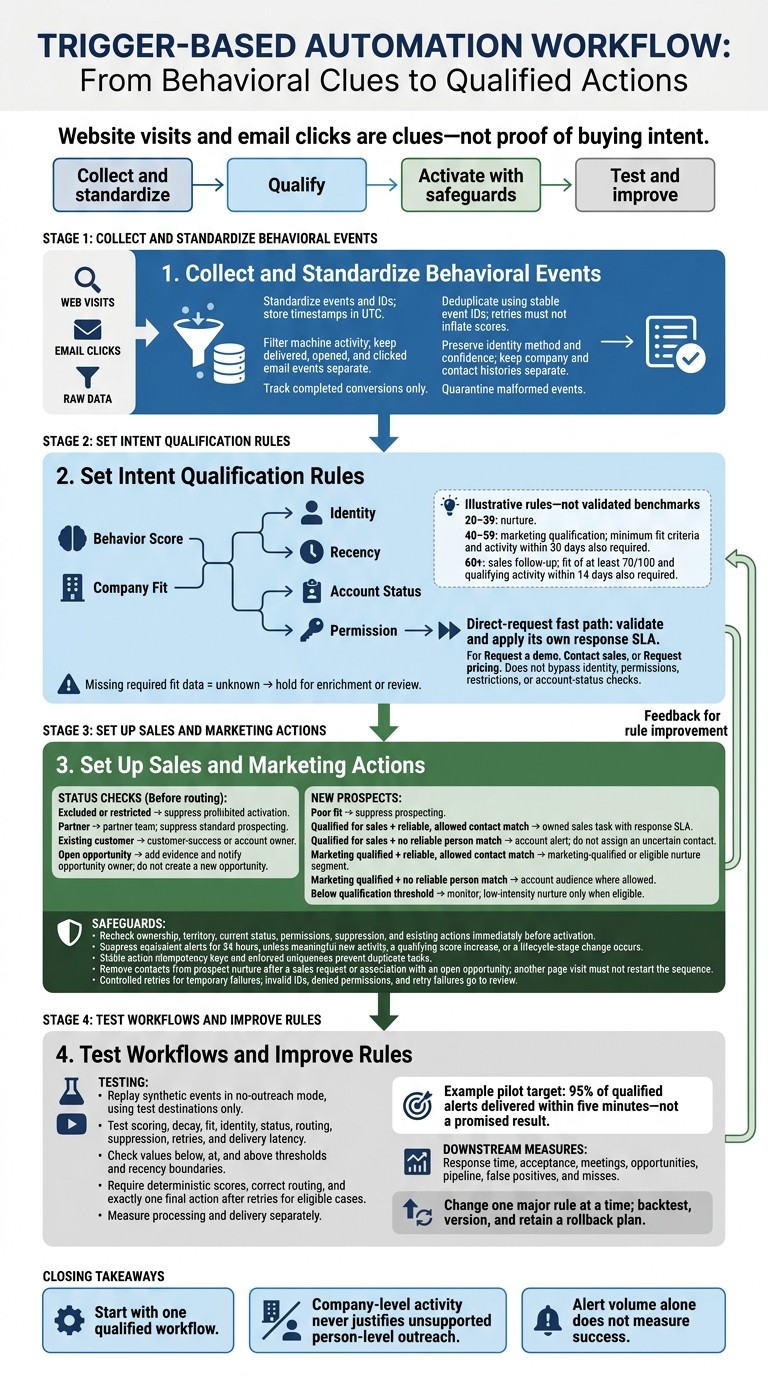
Intent Signal Automation: From Events to Qualified Actions
How To Select Intent Data & Signals To Build Trigger-Based Pipeline Generation Campaigns
Step 1: Collect and Standardize Behavioral Events
Collect behavioral events in a single schema. Use stable IDs and deduplication so score changes and triggers run on clean data. Track completed conversions only, and give each event a stable ID so a retried submission doesn’t count as a second conversion.
Choose Website, Email, and Conversion Signals
Use these events to drive triggers - not as proof of intent on their own. A completed demo request sends a stronger signal than browsing activity.
Signal | Intent strength* | Recency requirement | Identity requirement | Recommended use |
|---|---|---|---|---|
General content view | Low | Within 7–14 days | Anonymous acceptable for aggregate reporting | Engagement only; do not trigger outreach |
Pricing-page visit | Moderate | Within 3–7 days | Company or contact preferred | Combine with fit and repeat activity |
Product-page sequence | Moderate to high | Within 7 days | Company preferred; contact match helpful | Increase account-level research score |
Repeat sessions | Moderate | Within 7–14 days | Stable visitor or company identifier | Detect sustained interest rather than one-off traffic |
Email open | Low | Within 1–3 days | Contact identifier required | Use only as supporting evidence |
Email click | Moderate | Within 3–7 days | Contact and campaign identifiers preferred | Combine with page activity and conversion behavior |
Form submission | High | Within 1–7 days | Contact identifier preferred | Route for qualification; validate the form and consent data |
Trial signup | High | Immediate or within 24 hours | Known user or contact identifier required | Trigger lifecycle or sales actions |
Demo request | Very high | Immediate | Contact identifier required | Create a prompt sales task or alert after validation |
Strength labels and recency windows are hypotheses to test against sales conversations, accepted opportunities, and pipeline creation.
Filter email opens and clicks for machine activity. Keep delivered, opened, and clicked events separate, and flag suspected machine activity when that information is available.
Group visitor activity under a company only when identity resolution supports the match. Keep company and contact histories in separate fields, then qualify the events using score and fit rules.
Standardize Event Data and Identifiers
Use the same schema across all sources via our tracking API: event_id, event_type, occurred_at, visitor, session, contact, and company IDs, page URL, campaign context, source metadata, and account/opportunity status. Keep raw URLs and campaign parameters alongside their normalized values.
Store the identity method and confidence score. Preserve anonymous IDs when identity resolution isn’t available, and link later contact activity only through permitted, reliable matching. A company match does not identify the acting person.
Keep enrichment separate from immutable event records so later profile changes don’t rewrite activity history. Clean IDs and timestamps help the next step’s scoring and routing rules work reliably.
Store timestamps in UTC using ISO 8601:
2026-10-12T15:42:18Z
Display it as:
October 12, 2026, 11:42 AM ET
Before scoring, check for recognized event types, valid timestamps, duplicate IDs, completed conversions, and the identifiers required for the intended action. Quarantine malformed events. Make ingestion idempotent so retries can’t inflate scores.
Use these normalized events as inputs for the score and fit rules in Step 2, including score thresholds and identity checks.
Step 2: Set Intent Qualification Rules
Use the normalized events and identity data from Step 1 to score each account or contact, check fit, and route it to the right team.
Set Score Weights and Thresholds
Decide whether each rule uses a contact score or an account score. Trigger the rule when a qualifying event arrives or the score crosses a threshold. Where possible, recalculate scores from canonical events so expired signals drop out naturally.
The weights below are hypothetical. Calibrate them against conversion history and the volume sales can realistically review.
Signal or condition
Recency window
Frequency condition or cap
Example score contribution
Demo or contact-sales request
7 days
Once per contact per 30 days
+40
Pricing-page visit
14 days
Maximum 2 qualifying visits
+12 per visit
Product or integration-page visit
14 days
Maximum 3 qualifying visits
+8 per visit
Return visit from the same account
7 days
Maximum 2 qualifying events
+10 per event
High-value guide or case-study download
30 days
Once per asset
+6
Email reply or meeting booked
14 days
Once per campaign or contact
+20
Two or more contacts engaging
14 days
Once per account
+15 once
Set score bands at 20–39 for nurture, 40–59 for marketing qualification, and 60+ for sales follow-up. Marketing qualification also requires minimum fit criteria and activity within 30 days. Sales qualification requires fit of at least 70/100 and qualifying activity within 14 days.
Give direct requests - Request a demo, Contact sales, or Request pricing - a separate fast path with its own response SLA.
Check Company Fit and Account Status
After scoring, check fit and account status before activation. Keep fit separate from behavior.
Define acceptable industry, business model, employee count or revenue band, geography, account tier, and relevant technology environment. Use only a trusted CRM source to check ownership.
Treat missing required data as unknown and hold activation for enrichment or review. Save each attribute’s source and update time.
Before routing a new prospect, check whether the account is a customer, partner, excluded account, or has an open opportunity. Route unowned accounts by territory, and log the reason for every hold or suppression.
Match Contacts and Choose Account or Contact Actions
Person-specific actions require an authenticated-product user ID, CRM contact or lead ID, verified email, or another approved first-party identifier. Keep the original event identity, match method, and confidence. Never overwrite a contact or assign activity based on an uncertain match.
A reliable company match can support account-level handling without naming a person.
Apply the table’s rules in order. Restrictions and existing relationships come first. Every activation must include evidence, score, fit result, identity confidence, permission status, account status, timestamp, and rule version.
Company fit | Score qualification | Contact match | Account status | Output |
|---|---|---|---|---|
Any | Any | Any | Excluded or restricted | Suppress prohibited activation |
Any | Any | Any | Partner | Route to partner team; suppress standard prospecting |
Any | Any | Any | Existing customer | Route to customer-success or account owner |
Any | Any | Any | Open opportunity | Add evidence and notify the opportunity owner; do not create a new opportunity |
Unknown | Meets threshold | Any | New prospect | Hold for enrichment or review |
Poor fit | Any | Any | New prospect | Suppress prospecting |
Meets fit criteria | Meets sales threshold | Reliable and allowed | New prospect | Create owned sales task with response SLA |
Meets fit criteria | Meets sales threshold | No reliable person match | New prospect | Create an account alert; do not assign a contact on an uncertain match |
Meets fit criteria | Marketing threshold | Reliable and allowed | New prospect | Update marketing-qualified or nurture segment |
Meets fit criteria | Marketing threshold | No reliable person match | New prospect | Add to account audience where allowed |
Meets fit criteria | Below qualification threshold | Any | New prospect | Monitor and use low-intensity nurture only when eligible |
Use these qualification states in Step 3 to choose the sales or marketing action: a task, alert, or nurture action.
Step 3: Set Up Sales and Marketing Actions
Build each workflow as trigger → qualification → action → safeguards. Use the structured events, scores, and segments from Step 2 to send each classified signal to the right sales task, alert, or nurture action. Map destination fields, then set up routing, permissions, suppression, and delivery handling.
Create Sales Tasks and Account Alerts
Update account scores in the CRM. Before creating an assigned task or account alert, check the current owner and territory. Send accounts without an owner to a monitored queue.
Include the account, verified contact if available, triggering behavior, relevant pages or research topics, score change, event timestamp, and follow-up deadline. Keep company-only activity on the account record.
Suppress equivalent alerts for 24 hours unless there's meaningful new activity, a qualifying score increase, or a lifecycle-stage change. Use the same routing logic to keep account-level alerts separate from person-level nurture.
Update Marketing Segments and Nurture
Map qualified research topics to dynamic segments and eligible account audiences. Start contact nurture only when identity and communication permissions allow it. Company identification does not authorize person-level email.
Immediately remove contacts from prospect nurture after a sales request or association with an open opportunity. Record the suppression reason, timestamp, source event, and owner. Keep that suppression in place, and coordinate later messaging with the account owner. Another page visit should not restart the sequence.
Prevent Duplicate and Invalid Actions
Immediately before activation, recheck the record's status and whether the action already exists. Event deduplication blocks repeated events; cooldowns block repeated alerts.
Give each action a stable idempotency key and enforce uniqueness in the action store so concurrent workers cannot create duplicate tasks. Record both successful and no-action outcomes so retries don't recreate tasks.
Use controlled retries for temporary failures, such as timeouts and rate limits. Send invalid IDs, denied permissions, and retry failures to a review queue. Log the rule version, evaluation result, suppression reason, action status, retry count, and final delivery result. Use those logs to test delivery and refine the rules in the next step.
Step 4: Test Workflows and Improve Rules
Once the workflow is built, replay events before sending any live outreach.
Test Scoring, Identity Matches, and Delivery
Replay synthetic events in no-outreach mode, with outputs sent only to test destinations. For a qualified account alert, verify the full path in the same test run: ingestion, scoring, decay, fit checks, account status, contact matching, routing, suppression, retries, and delivery latency.
Hypothetical scenario
Expected score
Fit and match state
Expected output
Anonymous visitor views pricing twice in 24 hours
24
Target account meets fit criteria; no verified person
No sales alert below the sales threshold
Known contact views a product page
8
Reliable contact match; poor company fit
Suppress prospecting
Existing customer revisits pricing
12
Account match; customer status confirmed
Suppress acquisition outreach; route to customer-success or account owner
Duplicate pricing event with the same event ID
12, not 24
Fit account; reliable company match
Second event is ignored; no second action is created
Test scores below, at, and above the threshold. Check timestamps immediately inside, exactly at, and immediately outside every recency boundary, plus stale activity after decay.
Include missing fit data, conflicting owners, uncertain matches, suppressed accounts, and temporary delivery failures. Require deterministic scores, correct routing, and exactly one final action after retries for eligible cases. Measure processing and delivery separately. Start a limited rollout only when all checks pass.
Example pilot target: 95% of qualified alerts delivered within five minutes.
After the workflow passes, measure what happens downstream - not just whether alerts arrive.
Measure Results and Adjust Rules
For the qualified workflow, track response time, acceptance, meetings, opportunities, pipeline, false positives, and misses. Alert volume alone won't tell you whether the rules work.
Compare conversion rates by score band and account tier over fixed windows. Review high-scoring accounts that stalled and low-scoring accounts that converted. This helps separate weak scoring from poor follow-up.
Workflow | Eligible audience | Success metrics | Measurement window | Interpretation limits |
|---|---|---|---|---|
Sales follow-up | Fit accounts or contacts that cross the sales threshold and are not suppressed | Response time, sales acceptance, meetings, opportunities, pipeline, and revenue | 14–90 days | Seller capacity and assignment differences may affect results |
Nurture | Lower-scoring or sales-ineligible contacts and accounts that meet consent and segmentation rules | Engagement, return visits, qualified conversions, reactivation, and eventual opportunity creation | 30–180 days | Longer cycles, channel exposure, and unequal contactability make direct comparison difficult |
These audiences begin with different qualification levels. A higher sales conversion rate does not prove that sales routing caused it. Use a comparable holdout or randomized assignment where feasible.
Change one major rule at a time, backtest it, and check expected alert volume against sales capacity. Record the version, effective date, owner, changed weights, threshold values, affected segments, and rollback plan.
Conclusion: Start With 1 Qualified Workflow
Use one measurable workflow as your first production test. Expand only after qualification, suppression, and delivery prove reliable.
For example, measure a qualified account alert against sales-accepted opportunities within 30 days.
Company-level activity never justifies unsupported person-level outreach.
FAQs
How do I calibrate intent scores with limited conversion data?
Review recent closed-won deals for behavioral signals in the 30 days before closing. Assign points to each signal, giving demo requests and pricing page visits more weight than email opens.
Compare scoring rules across teams with conversion trends. Apply time-based decay to scores, since signals often lose relevance after 24 hours. A/B test scoring changes, then track lead-to-opportunity progression and conversion rates by score range to fine-tune your model.
How should I handle conflicting contact matches?
Set clear matching rules: use email addresses for contacts and company domains for accounts. Normalize company domains before syncing so you don’t create duplicate records or split a company’s history across multiple records.
Use workflow filter nodes to let only complete, high-quality records into your CRM. Set overwrite rules to protect fields owned by sales while still allowing updates to time-sensitive behavioral data.
How can I tell whether automation improves pipeline?
Track identification-to-outreach efficiency: aim to contact more than 90% of identified visitors within 24 hours. Monitor lead-to-opportunity conversion to check whether your scoring puts high-intent leads first. Structured systems often see conversion rates up to 73% higher.
To measure whether automated workflows turn visitor interest into engagement, also track:
Visitor-sourced pipeline: at least 25% of your total pipeline
Speed-to-lead: how soon you contact a lead
Reply rates: above 5%
Meeting booking rates: over 3%
Related Blog Posts
Build on the LeadBoxer Platform
APIs for tracking, company identification, enrichment and scoring. The first 25,000 credits are free.